CS184/284A Fall 2026 Homework 2 Write-Up
Link to webpage: hw2-rakeshvmehta-hw2-writeup
Link to GitHub repository: hw2-rakeshvmehta-hw2
Overview
This homework covers two ways of representing smooth shapes. Section I evaluates Bezier curves and surfaces with de Casteljau's algorithm, which computes a point on a curve or surface through repeated linear interpolation between control points. It is used to evaluate a custom 2D curve with six control points and to convert the teapot's Bezier patches into a triangle mesh. Section II works with triangle meshes stored in the half-edge data structure: it computes area-weighted vertex normals for smooth shading, implements the local edge flip and edge split operations by reassigning half-edge pointers, and combines those two operations with new vertex positions to implement Loop subdivision, which both smooths a mesh and increases its resolution.
What I found most interesting was how much of this maps onto tools I already knew from Blender. A Blender "loop" (a face corner) is essentially a half-edge, and the fact that each half-edge has only one twin explains why non-manifold geometry, like an edge shared by three faces, cannot be stored. An edge flip, Blender's "Rotate Edge," does not move a single vertex, yet it still changes the surface and its shading, which showed me that a mesh's shape lives in its connectivity as much as in its positions. Loop subdivision follows the same "split, then smooth by averaging" recipe as Blender's Subdivision Surface modifier, just for triangles instead of quads, and the lopsided cube in Part 6 finally explained why modelers avoid irregular vertices: the smoothing weights depend on how many edges meet at a vertex, so uneven connectivity pulls the surface unevenly. I also noticed that de Casteljau's algorithm and Loop subdivision share one idea: every new point is a weighted average of old points whose weights add to 1. That is why a Bezier curve stays inside its control points and why a subdivided mesh shrinks slightly.
Section I: Bezier Curves and Surfaces
Part 1: Bezier curves with 1D de Casteljau subdivision
De Casteljau's algorithm. A Bezier curve is defined by a list of control points, and de Casteljau's algorithm finds the point on the curve at a parameter \(t\) between 0 and 1 using only repeated linear interpolation (Curves lecture, "Bézier Curves – de Casteljau Algorithm"). Starting with \(n\) control points \(p_0, \dots, p_{n-1}\), each step interpolates between every pair of neighboring points:
\( p_i' = (1 - t)\, p_i + t\, p_{i+1}, \qquad i = 0, \dots, n - 2 \)
Each step produces one fewer point: \(n\) points become \(n - 1\), then \(n - 2\), and so on, until a single point remains. That point lies on the Bezier curve at parameter \(t\). Sweeping \(t\) from 0 to 1 traces out the whole curve, which always starts at the first control point and ends at the last.
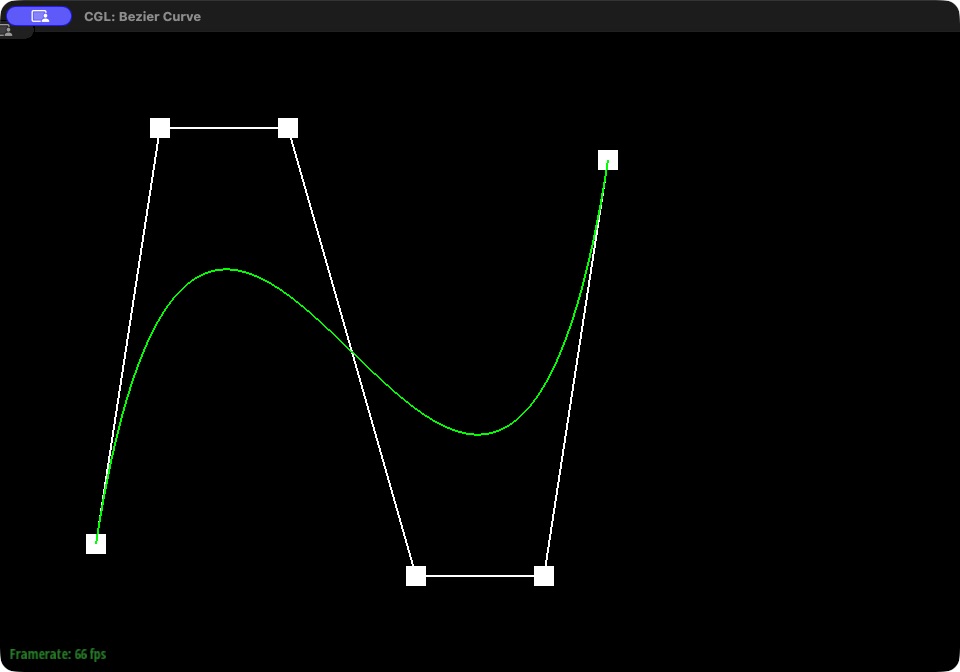
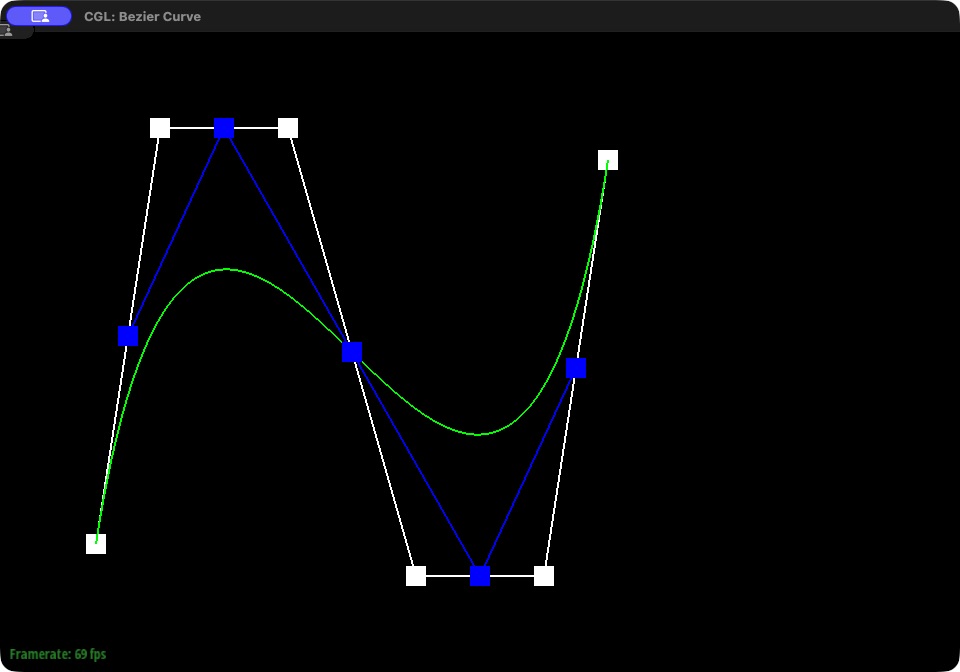
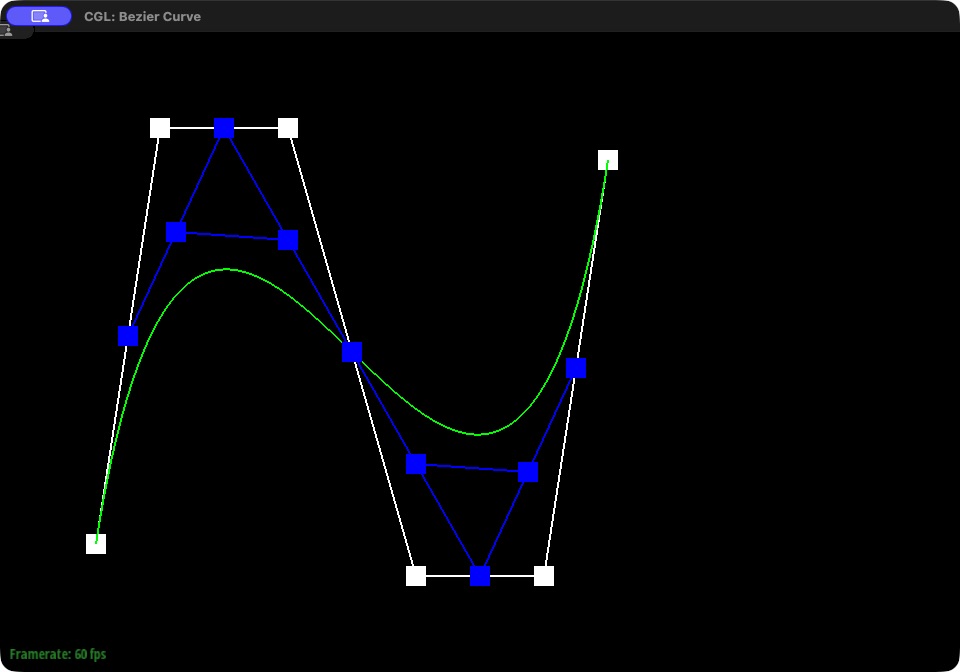
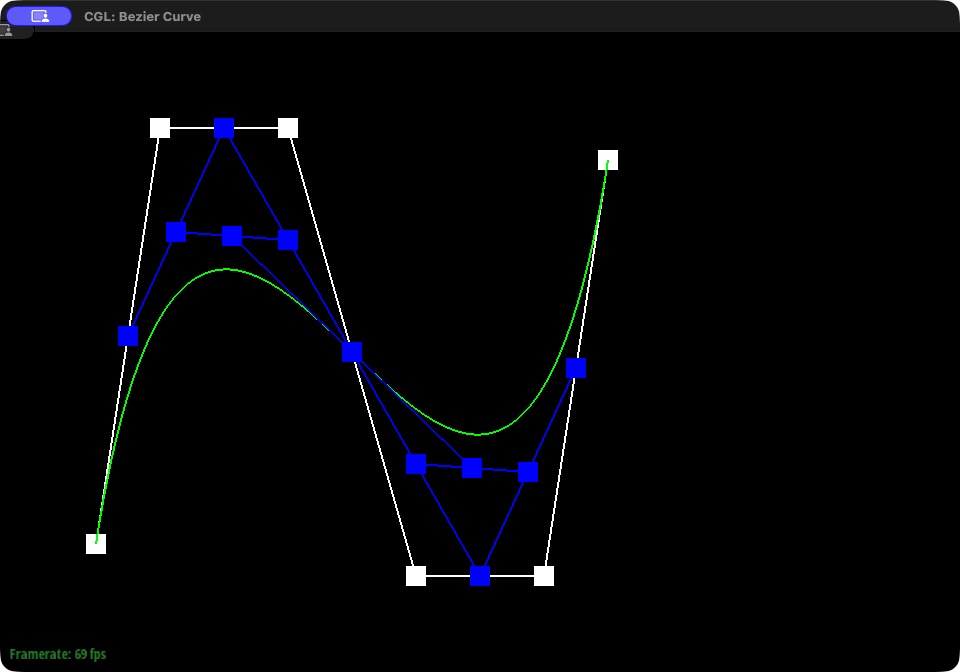
Implementation. BezierCurve::evaluateStep performs one level of the algorithm. It loops over each pair of neighboring points, computes \((1 - t)\,p_i + t\,p_{i+1}\) using the curve's current \(t\), and returns the \(n - 1\) interpolated points. The viewer calls this function once per level, so each press of E draws the next level until only the final point remains.
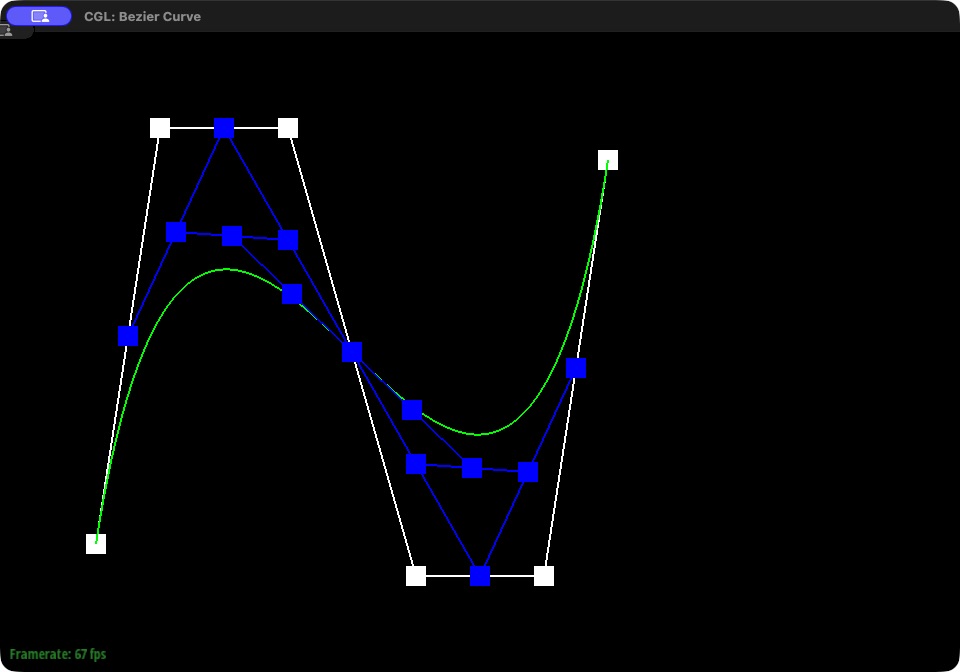
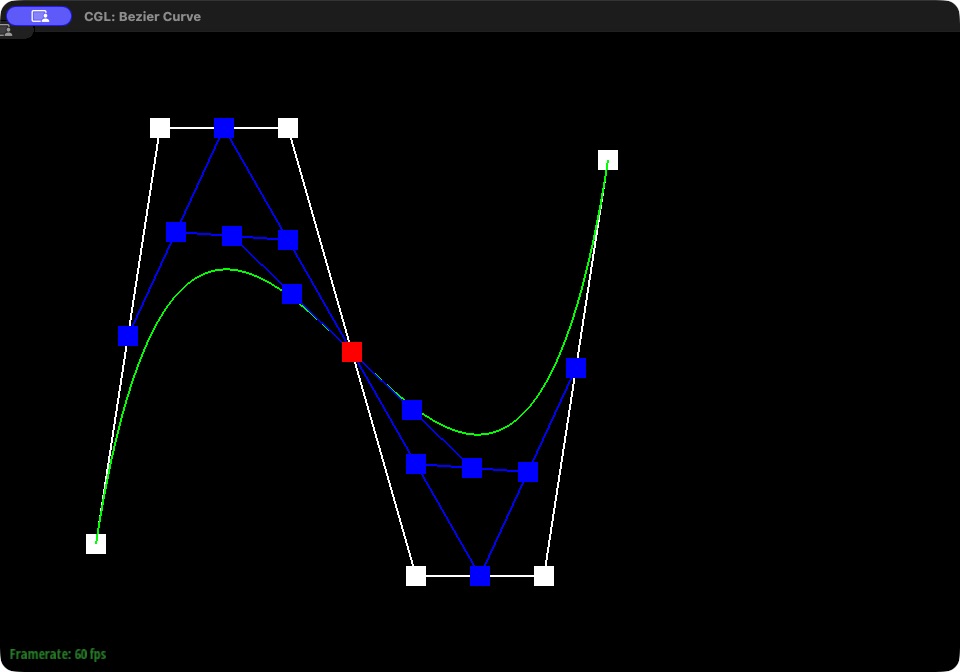
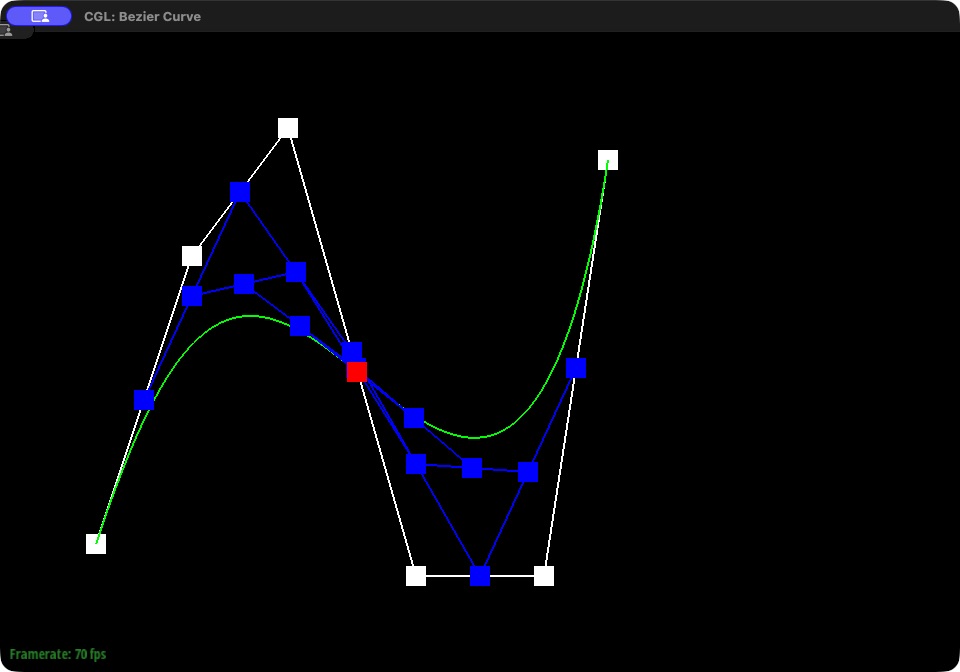
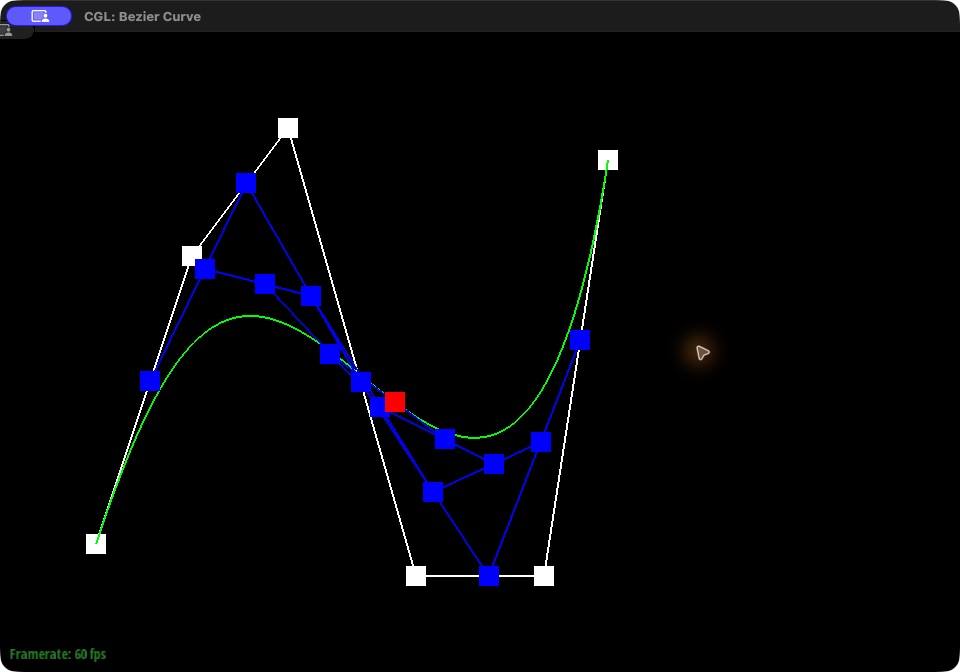
Custom curve. The curve below uses six control points (bzc/curve6.bzc) arranged so that it rises, dips, and rises again. The first six screenshots step through every level at the same \(t\): the 6 original control points, then 5, 4, 3, and 2 interpolated points, and finally the single red point on the curve. For the last two screenshots, the second control point was moved from \((0.25, 0.85)\) to \((0.30, 0.65)\) (bzc/curve6_modified.bzc), which flattens the curve's first hump, and \(t\) was then changed by scrolling, which slides the red point and every intermediate level along the curve.
|
|
|
|
|
|
|
|
Part 2: Bezier surfaces with separable 1D de Casteljau
Extending de Casteljau to surfaces. A bicubic Bezier surface patch is defined by a 4×4 grid of control points and two parameters, \(u\) and \(v\). Each row of the grid is itself a Bezier curve, so the surface can be evaluated by applying the 1D algorithm from Part 1 twice (Curves lecture, "Method 1: Separable 1D de Casteljau Algorithm"):
- Run 1D de Casteljau at \(u\) on each of the 4 rows. This gives 4 points, one on each row's curve.
- Treat those 4 points as the control points of a new "moving" curve that runs across the rows, and run 1D de Casteljau on it at \(v\). The single point that comes out is the surface point at \((u, v)\).
Changing \(u\) slides the moving curve along the rows, and changing \(v\) moves along that curve, so together the two parameters cover the entire patch.
Implementation. BezierPatch::evaluateStep is the 3D version of Part 1's step: it interpolates every pair of neighboring points with \((1 - t)\,p_i + t\,p_{i+1}\). evaluate1D calls evaluateStep repeatedly until one point remains, fully evaluating a 1D Bezier curve at \(t\). evaluate(u, v) follows the two steps above: it calls evaluate1D at \(u\) on each row of the 4×4 control grid, then calls evaluate1D at \(v\) on the 4 results. The starter code evaluates each patch on a grid of evenly spaced \((u, v)\) values and splits each small square of resulting points into two triangles, which is how the teapot below is built from the patches in bez/teapot.bez.
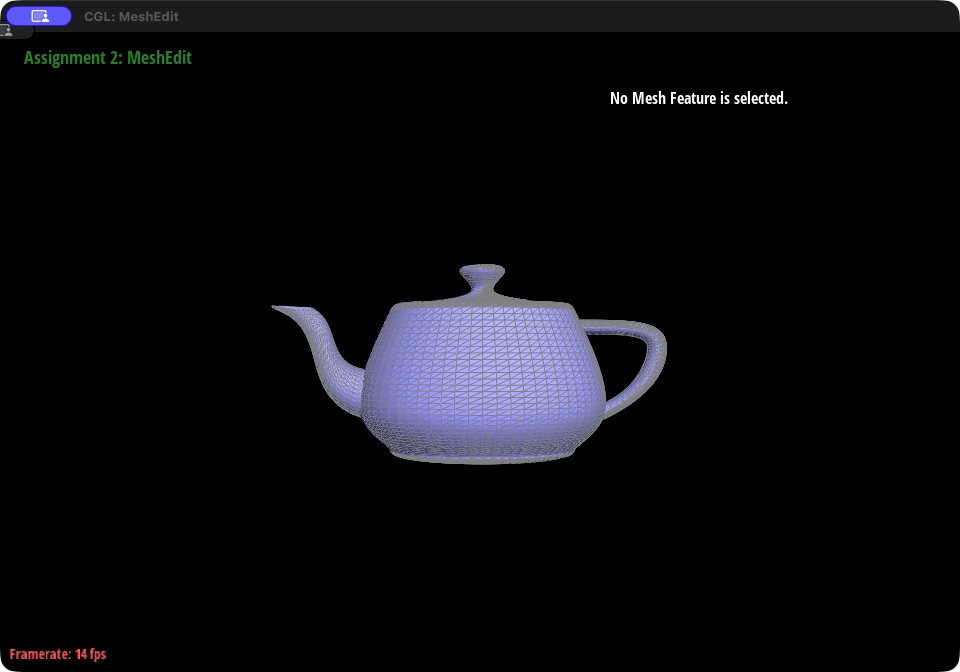
bez/teapot.bez evaluated with separable de Casteljau, triangle edges shown.Section II: Triangle Meshes and Half-Edge Data Structure
Part 3: Area-weighted vertex normals
Idea. A triangle mesh only has true normals per face, and shading with them makes every triangle a flat facet. Smooth shading instead gives each vertex its own normal, computed as a weighted average of the normals of the surrounding faces (Pipeline lecture, "Defining Per-Vertex Normal Vectors"):
\( N_v = \frac{\sum_i w_i N_i}{\sum_i w_i} \)
With area weighting, \(w_i\) is the area of face \(i\), so large triangles count more than thin sliver triangles.
Implementation. Vertex::normal walks around the vertex with h = h->twin()->next(), which steps from one outgoing half-edge to the next until it returns to the start. For each face it visits (skipping the empty boundary face of an open mesh), it takes the triangle's positions \(a\), \(b\), \(c\) and computes the cross product \((b - a) \times (c - a)\). This vector points along the face normal and its length is twice the triangle's area, so it is already the face normal scaled by its area weight. Summing these raw cross products, without normalizing each one, therefore gives the area-weighted sum directly. The sum is normalized to unit length at the end, which also makes the factor of 2 and the division by \(\sum_i w_i\) unnecessary. If the sum has zero length (every surrounding face is degenerate), the function returns a zero vector instead of dividing by zero.
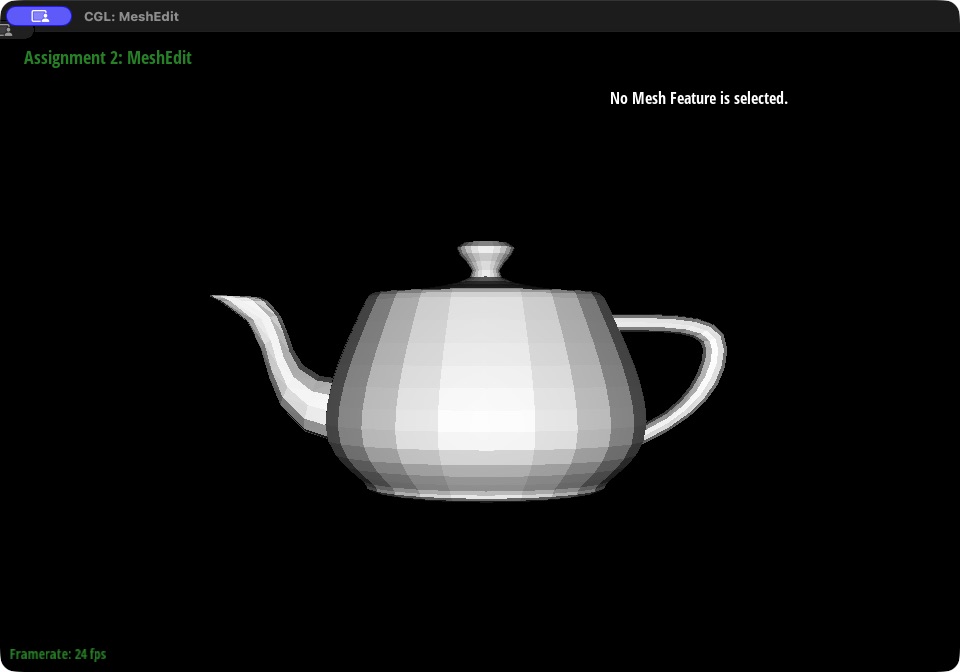
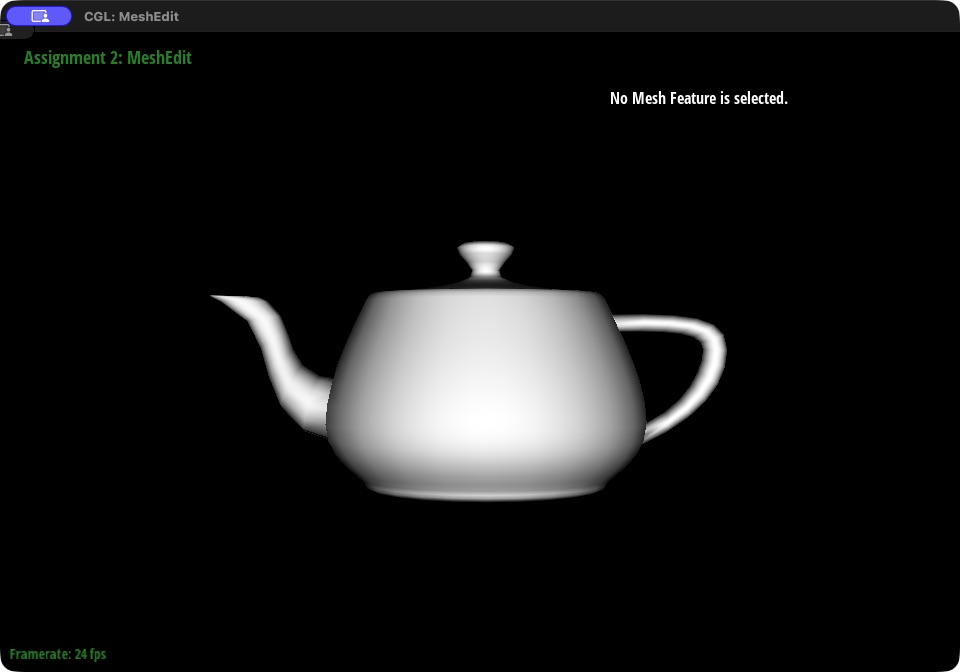
Result. The screenshots below show dae/teapot.dae from the same camera. With face normals, each triangle has a single shade, so the body shows distinct vertical bands of flat facets. With area-weighted vertex normals (toggled with Q), the shading blends smoothly across the body, spout, and handle. Only the lighting changes; the outline stays the same because no vertex has moved.
|
|
Part 4: Edge flip
What a flip does. An edge \(b\)–\(c\) is shared by two triangles, \((a, b, c)\) and \((c, b, d)\). Flipping it removes \(b\)–\(c\) and replaces it with the other diagonal, \(a\)–\(d\), so the two triangles become \((a, d, c)\) and \((d, a, b)\). No vertex moves and no elements are created or deleted; the same 6 half-edges, 5 edges, 2 faces, and 4 vertices are reconnected.
Implementation. HalfedgeMesh::flipEdge works in three steps.
- Save everything first. Before changing any pointer, it stores the 6 half-edges of the two triangles (\(h_0\) through \(h_5\)), the 4 vertices \(a, b, c, d\), and the 2 faces. This matters because once any pointer changes, an expression like
h0->next()->next()would follow the new connectivity instead of the old. - Reconnect the 6 half-edges. Each half-edge gets its
next,twin, starting vertex, edge, and face set withsetNeighbors. The shared half-edges \(h_0\) and \(h_3\) now run between \(a\) and \(d\), and the two outer half-edges that move to the other triangle get their face updated. The new triangles are ordered \((a, d, c)\) and \((d, a, b)\) so they keep the counterclockwise orientation of the rest of the mesh; a reversed triangle would have an inward-facing normal and render dark. - Repair stored half-edges. Vertex \(b\) may have stored \(h_0\) as its outgoing half-edge, but after the flip \(h_0\) starts at \(a\), so \(b\) is reassigned to another of its outgoing half-edges (and likewise for \(c\)). The edge and both faces are also given half-edges that belong to them after the flip.
Boundary edges are not flipped: they have only one real triangle, and flipping into the empty boundary face would corrupt the mesh, so the function returns immediately.
Debugging journey. No holes, crashes, or black faces appeared in the viewer. That alone proves little, because the starter code only checks the mesh's structure when building it from a file; nothing rechecks it after a flip or split, so a bad pointer can go unnoticed until a later operation walks over it. The flip was therefore checked with a separate test program that validates every pointer after each operation: twins point back to each other, every face's next pointers close into a loop of 3, every vertex's ring of half-edges is complete, and every vertex, edge, and face stores a half-edge that actually belongs to it. The tests confirm that a flip produces the opposite diagonal, that flipping the same edge twice restores the original triangles, and that boundary edges are left unchanged. They also run 220 consecutive legal flips across three test meshes (a two-triangle square, an octahedron, and a 5×5 grid), validating the whole mesh after every flip. All tests pass.
Two real problems did come up, neither of them in flipEdge itself:
- The test initially crashed. The validator first located boundary loops through each boundary face's stored half-edge, but the starter's mesh builder leaves that pointer unset for boundary faces. The test was changed to find boundary loops by following half-edges instead; the starter code was not modified.
- Clicking stopped selecting edges. While taking screenshots, the display scale changed, and clicks no longer selected the edge under the cursor even when the pointer was directly on the mesh. The starter code converted mouse coordinates using a high-DPI setting fixed at startup, so
Viewer::cursor_callbackinCGL/src/viewer.cppwas changed to compute the conversion from the window's current size and framebuffer size on every mouse move, which fixed selection. This is the only change outsidestudent_code.cpp.
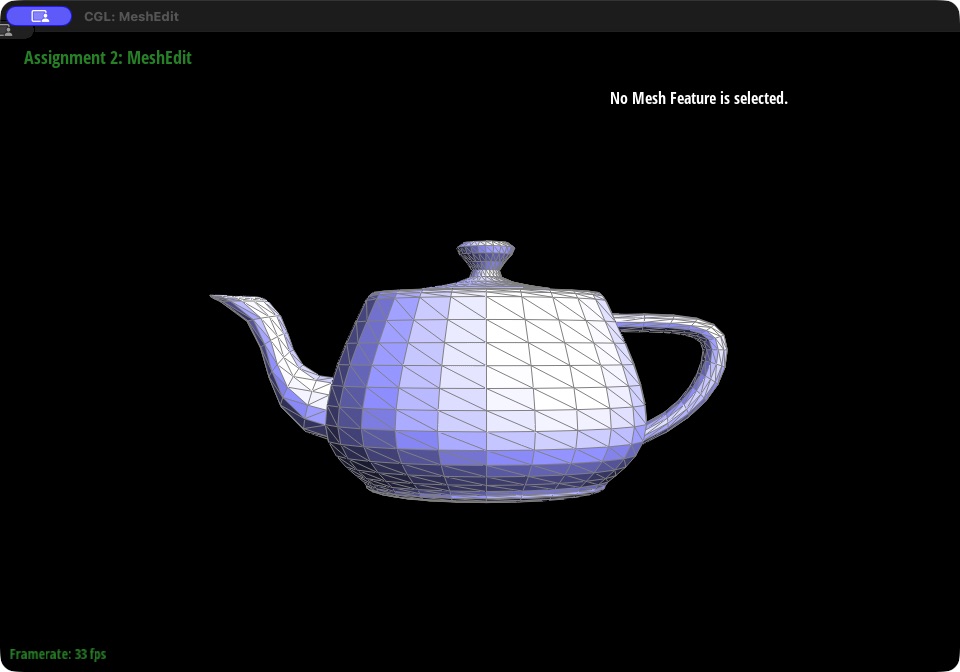
Result. The screenshots below show dae/teapot.dae before and after three flips near the middle of the body's front. Those three diagonals now run the other way, while every vertex and the overall shape stay exactly the same.
|
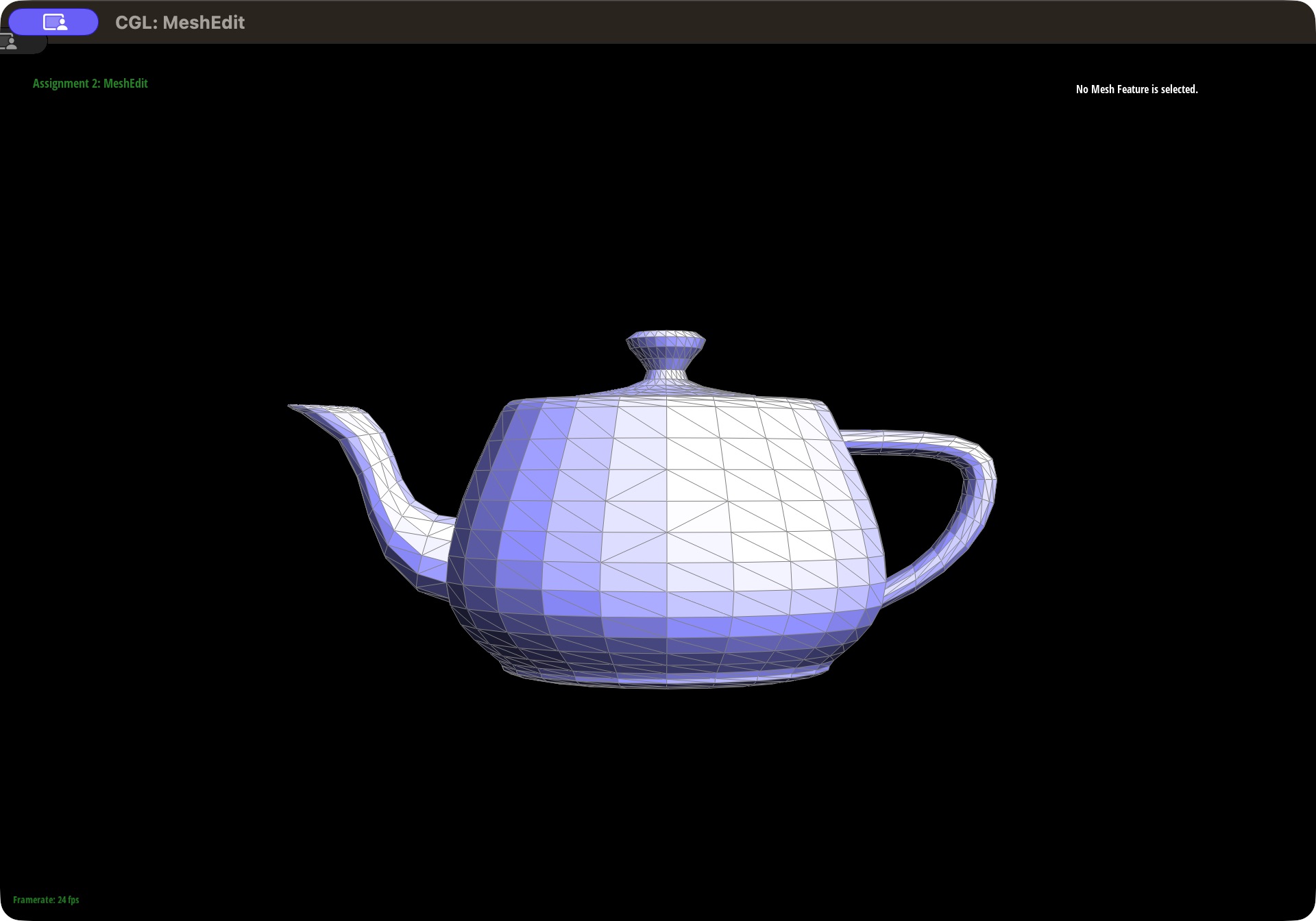
|
Part 5: Edge split
What a split does. Using the same labels as Part 4, edge \(b\)–\(c\) is shared by triangles \((a, b, c)\) and \((c, b, d)\). Splitting it adds a new vertex \(m\) at the midpoint of \(b\)–\(c\) and connects \(m\) to the two opposite vertices \(a\) and \(d\). The two triangles become four: \((b, m, a)\), \((m, c, a)\), \((c, m, d)\), and \((m, b, d)\).
Implementation. HalfedgeMesh::splitEdge follows the same pattern as the flip:
- Save the old elements. It stores the 6 existing half-edges, the 4 vertices, and the 2 faces before changing anything.
- Create exactly the new elements. A split always adds 1 vertex (\(m\), placed at \(\frac{b + c}{2}\)), 3 edges (\(m\)–\(c\), \(m\)–\(a\), \(m\)–\(d\)), 2 faces, and 6 half-edges (two per new edge). The original edge is reused as the \(b\)–\(m\) half, and the two original faces are reused as two of the four new triangles.
- Connect the four triangles. Every half-edge, old and new, gets its
next,twin, starting vertex, edge, and face set withsetNeighbors. Twins are set in both directions, and each triangle's threenextpointers close into a loop, since an unclosed loop would leave a hole in the mesh. All four triangles keep the mesh's counterclockwise orientation. - Fix the stored half-edges. The new vertex, every new edge, and all four faces are given a half-edge that belongs to them, and vertex \(c\) is updated if its old outgoing half-edge now starts at \(m\).
For Loop subdivision in Part 6, the split also marks \(m\) as a new vertex and labels its edges: the two halves of the original edge (\(b\)–\(m\) and \(m\)–\(c\)) are marked as not new, and only the two edges out to \(a\) and \(d\) are marked as new. Since Part 6 flips only new edges, this keeps it from cutting across an original edge.
Boundary edges. Splitting boundary edges is optional and was not implemented. For a boundary edge, splitEdge returns immediately without changing the mesh, so it never creates a broken triangle on the missing side.
Debugging journey. As with the flip, nothing went visibly wrong in the viewer, so the split was checked with the same pointer validator from Part 4. Counting elements is a useful sanity check: a split must add exactly 1 vertex, 3 edges, 2 faces, and 6 half-edges and leave the number of boundary loops unchanged. As a result, \(V - E + F\) changes by \(1 - 3 + 2 = 0\), so this quantity (the Euler characteristic) stays constant no matter how many splits are performed, and a split that corrupted the mesh would usually show up as a wrong count. The tests confirm that the new vertex lies exactly at the midpoint, that the four triangles match the expected ones with correct orientation, that no existing vertex moves, that the new vertex has degree 4 with exactly two old and two new edges, and that boundary edges are left unchanged. They then run 70 rounds of splits mixed with flips on open and closed test meshes, validating every pointer after each operation. These tests and the 220-flip test from Part 4 all pass.
Results. The first pair of screenshots shows dae/teapot.dae before and after two splits on the front of the body; each split adds a vertex at the middle of a diagonal, where four edges now meet. The second pair shows one split followed by a flip of one of its new edges, which changes the triangles around the new vertex without moving any vertex.
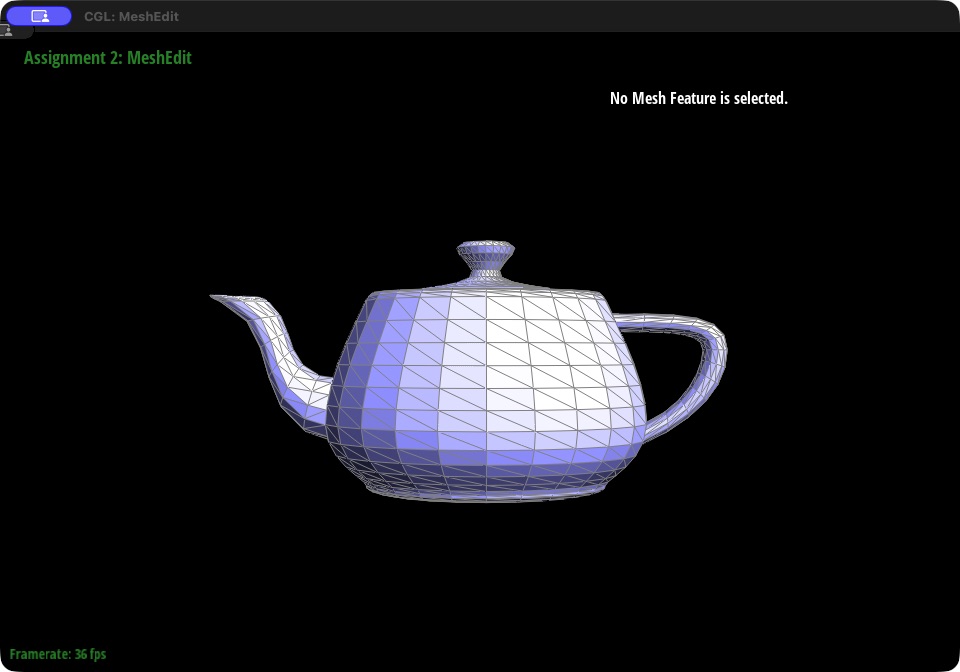
|
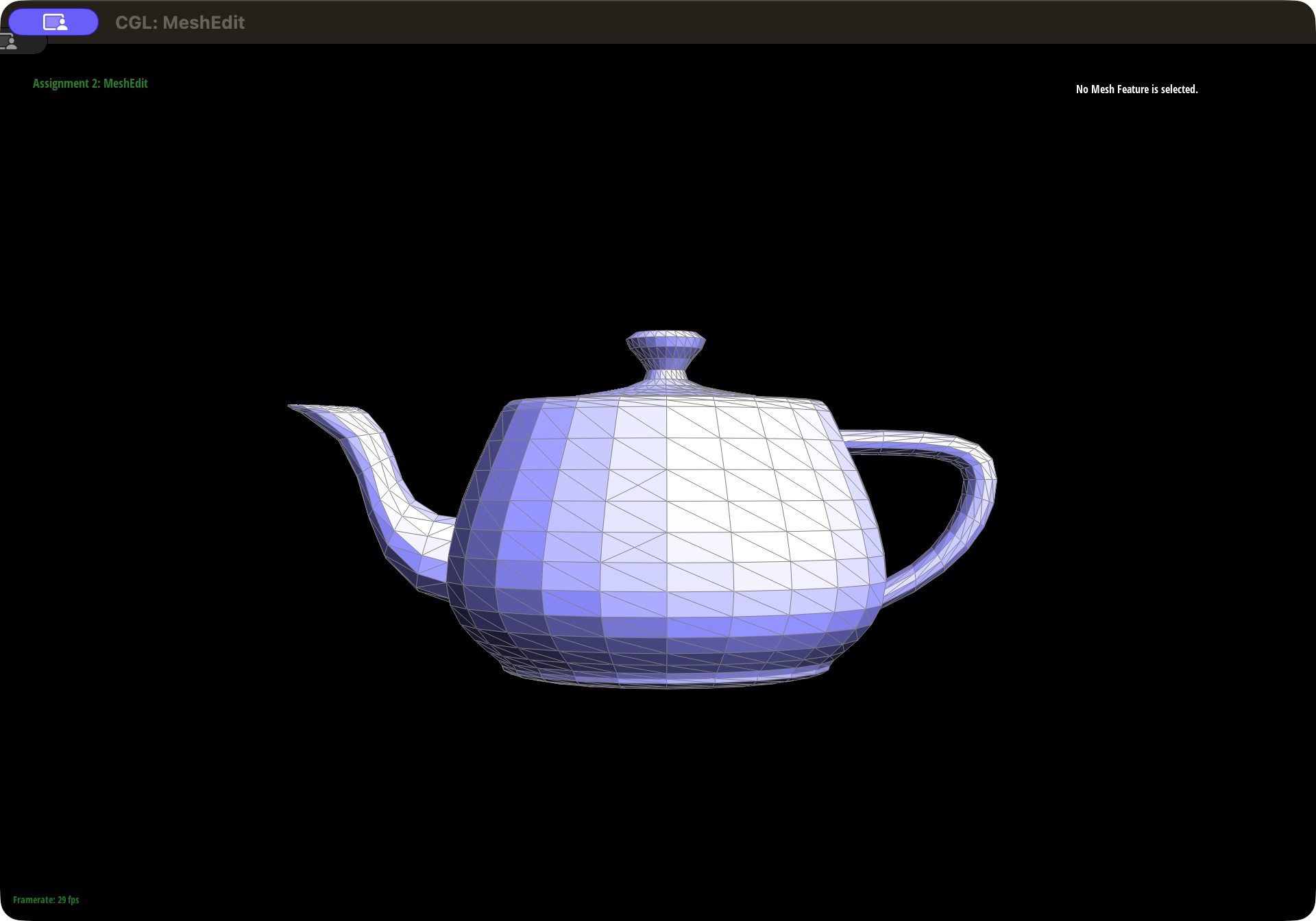
|
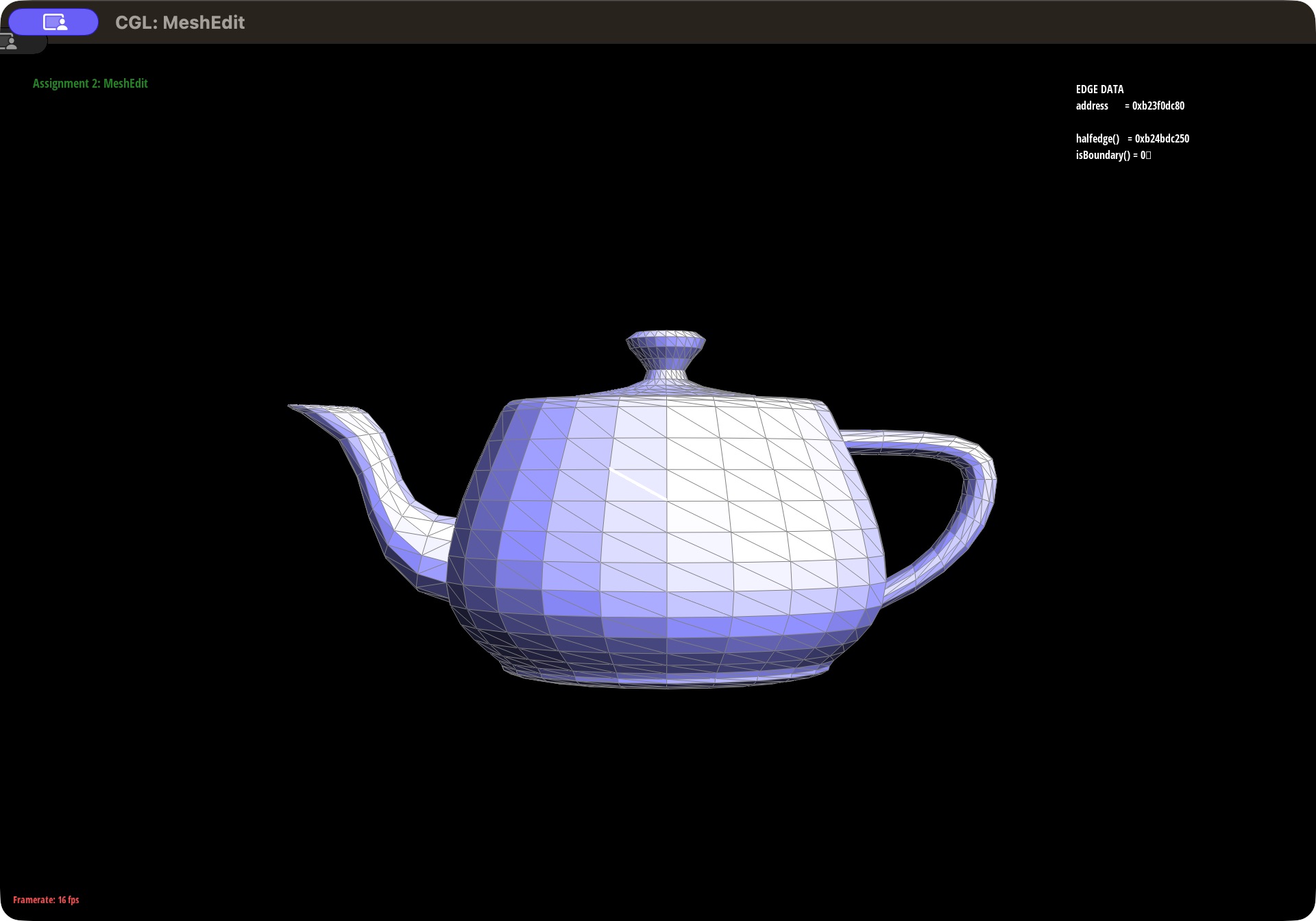
|
|
Part 6: Loop subdivision for mesh upsampling
Idea. Loop subdivision splits every triangle into four smaller ones and moves every vertex to a weighted average of nearby vertices, so the mesh becomes both finer and smoother. It uses two update rules, given in the homework handout. For a new vertex on edge \(A\)–\(B\), where the two triangles sharing that edge have opposite vertices \(C\) and \(D\):
\( \text{new position} = \frac{3}{8}(A + B) + \frac{1}{8}(C + D) \)
For an old vertex with \(n\) neighbors (its degree):
\( \text{new position} = (1 - n u)\,\text{original position} + u \cdot \text{sum of original neighbor positions}, \qquad u = \begin{cases} \frac{3}{16} & n = 3 \\ \frac{3}{8n} & \text{otherwise} \end{cases} \)
In both rules the weights sum to 1, so every new position is an average of nearby old positions.
Implementation. Instead of building the four new triangles directly, MeshResampler::upsample combines the edge split and edge flip from Parts 4 and 5:
- Compute the new positions of old vertices. For every vertex, it walks around the vertex to sum its neighbors' positions and count its degree \(n\), stores the old-vertex rule's result in
newPosition, and marks the vertex as old. - Compute the positions of the future edge vertices. For every edge, it finds \(A\), \(B\), \(C\), and \(D\), stores the edge-vertex rule's result in the edge's
newPosition, marks the edge as old, and saves the edge in a list. - Split every original edge. It splits each edge in the saved list and copies that edge's stored position into the new vertex. Using the saved list matters: looping over the mesh's live edge list would also reach the edges just created by the splits and never finish.
- Flip edges that connect an old vertex to a new vertex. After the splits, some new edges run from an original vertex to a new vertex across an original triangle. Flipping every new edge with one old and one new endpoint leaves each original triangle divided into exactly four. Because splits mark the two halves of an original edge as not new, those halves are never flipped.
- Move everything at once. Finally, it copies
newPositionintopositionfor every vertex.
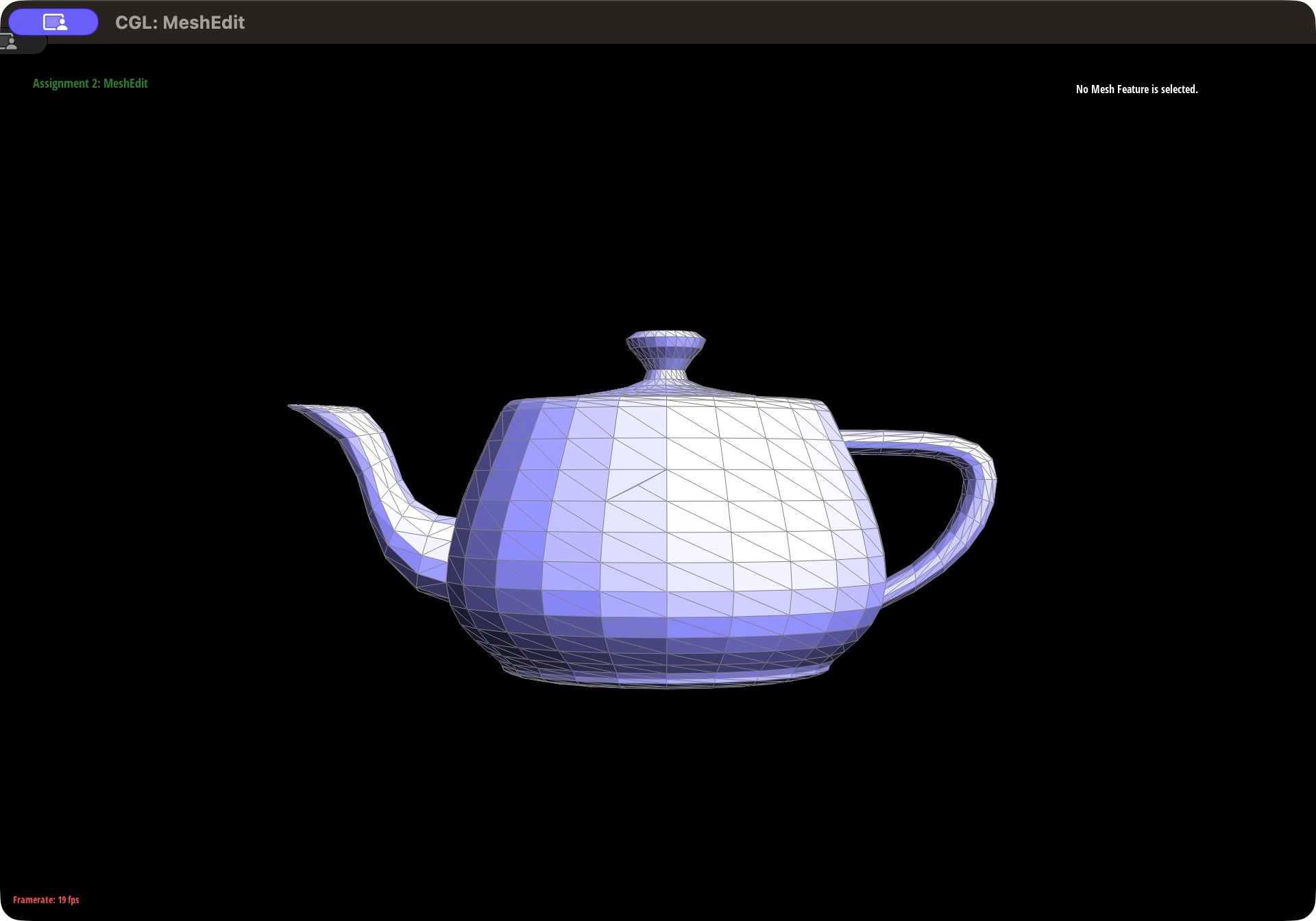
Two details make this reliable. First, every new position is computed from the untouched original mesh, and nothing moves until the last step. If vertices moved one at a time, each result would depend on whether its neighbors had already moved, so the output would depend on the order of the loop. Second, the weights are written as 3.0 / 8.0 and 3.0 / 16.0 rather than 3 / 8, because integer division would evaluate to 0. Subdividing meshes with boundaries is optional and was not implemented, so open meshes are left unchanged.
The implementation was checked with a test that runs 8 rounds of subdivision on meshes with vertices of degree 3, 4, 5, and 6. After each round it verifies the exact element counts (a closed mesh with \(V\) vertices, \(E\) edges, and \(F\) faces must end with \(V + E\) vertices, \(2E + 3F\) edges, and \(4F\) faces), that every new vertex has degree 6, that old vertices keep their degree, and that every position matches an independent computation of the two rules. It also checks that open meshes are left unchanged. All checks pass.
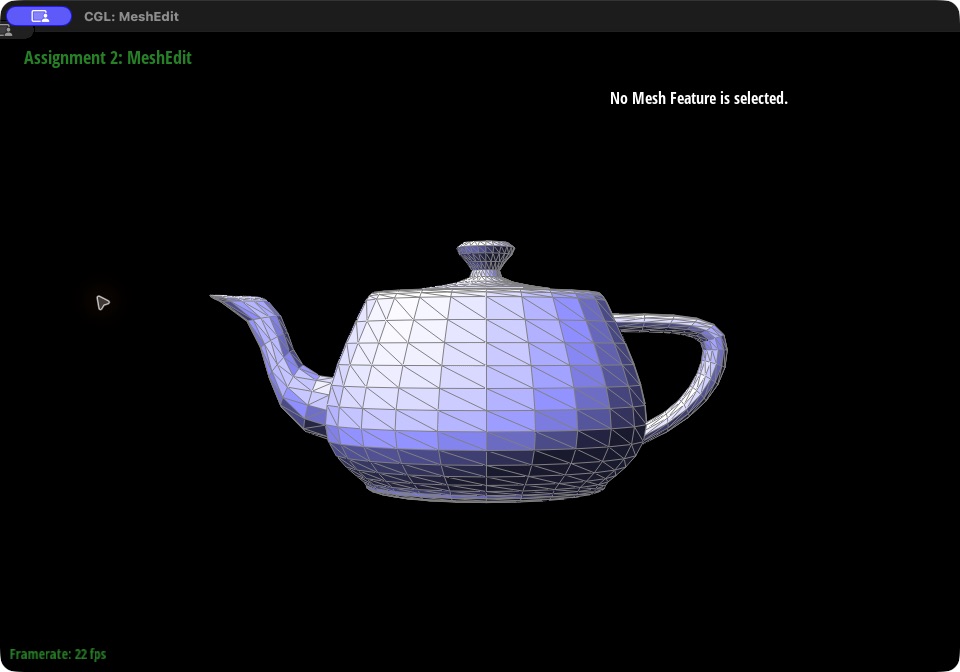
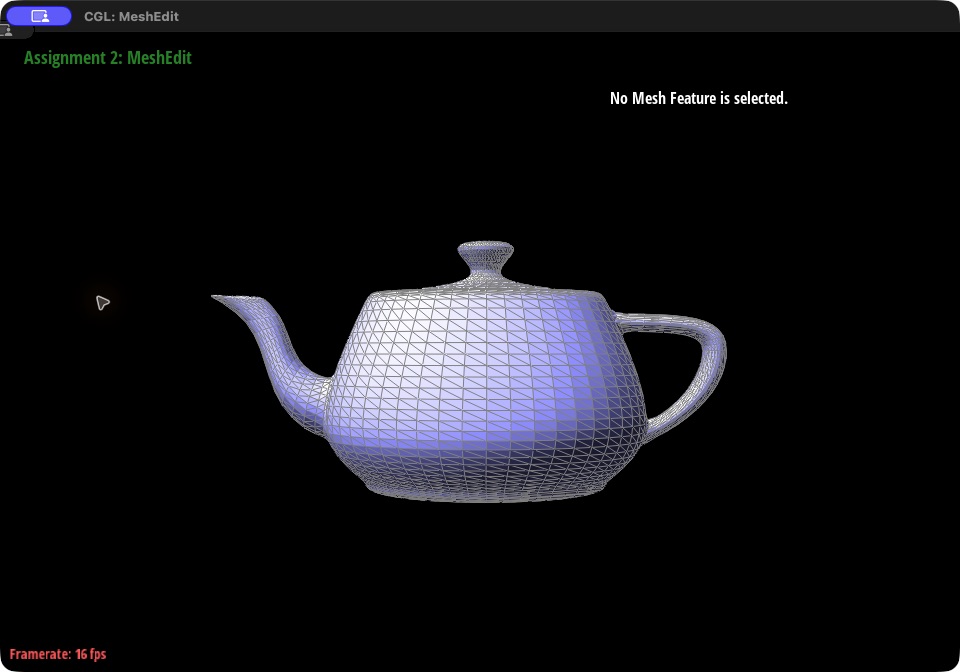
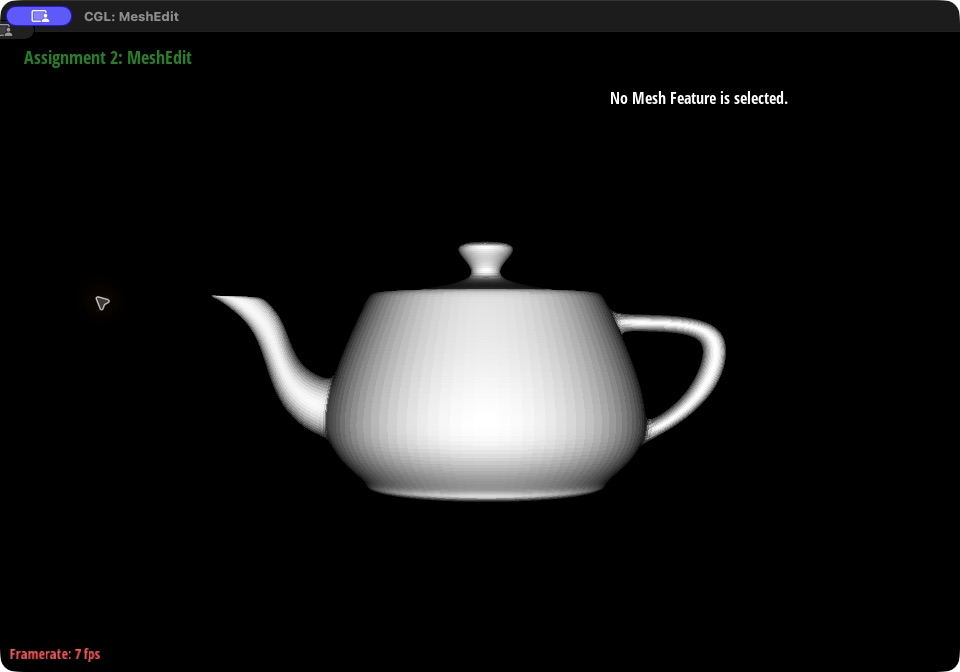
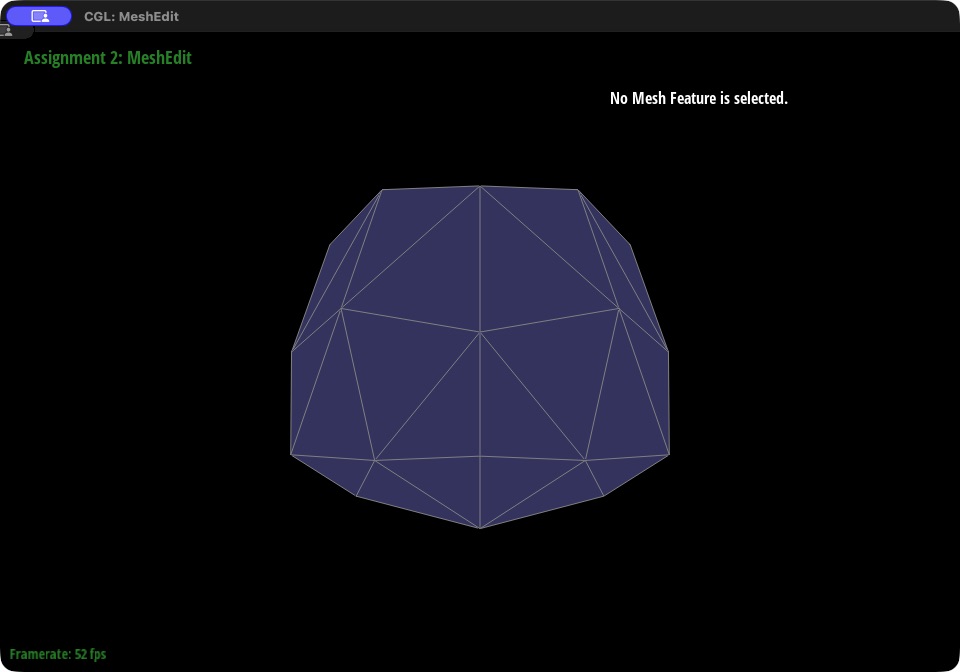
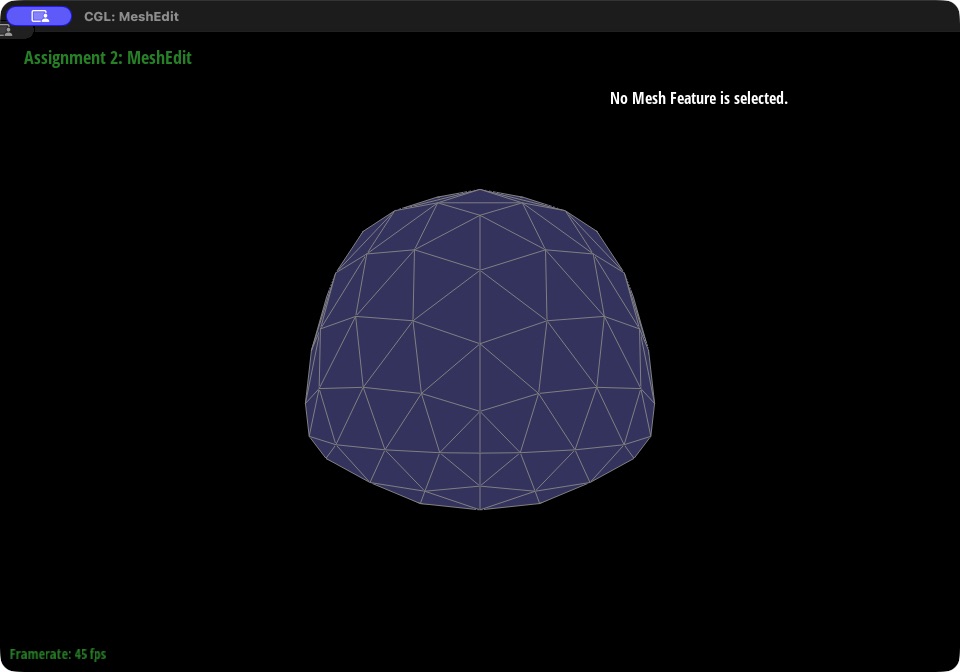
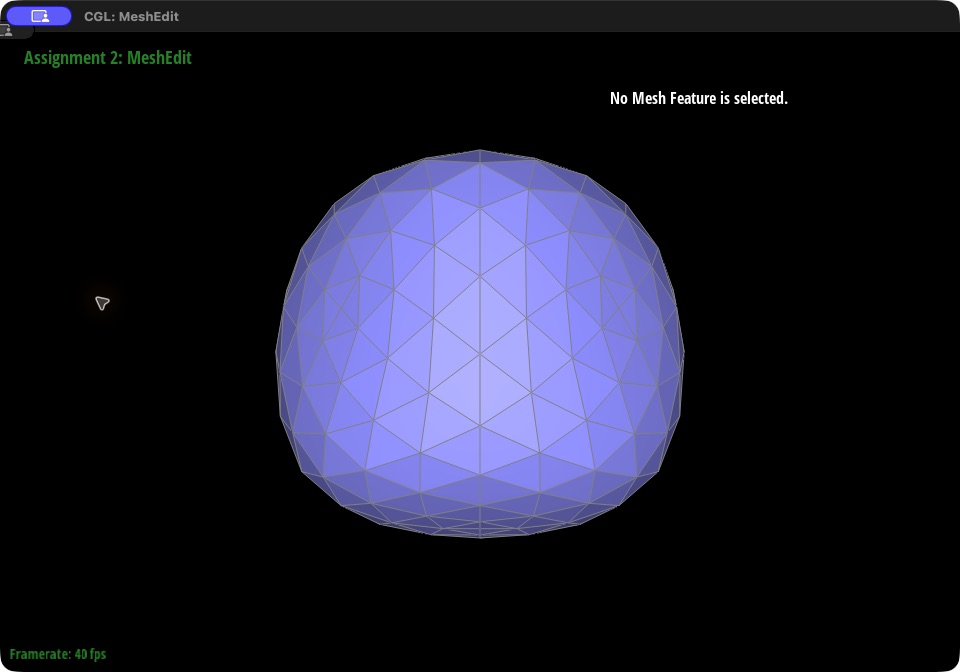
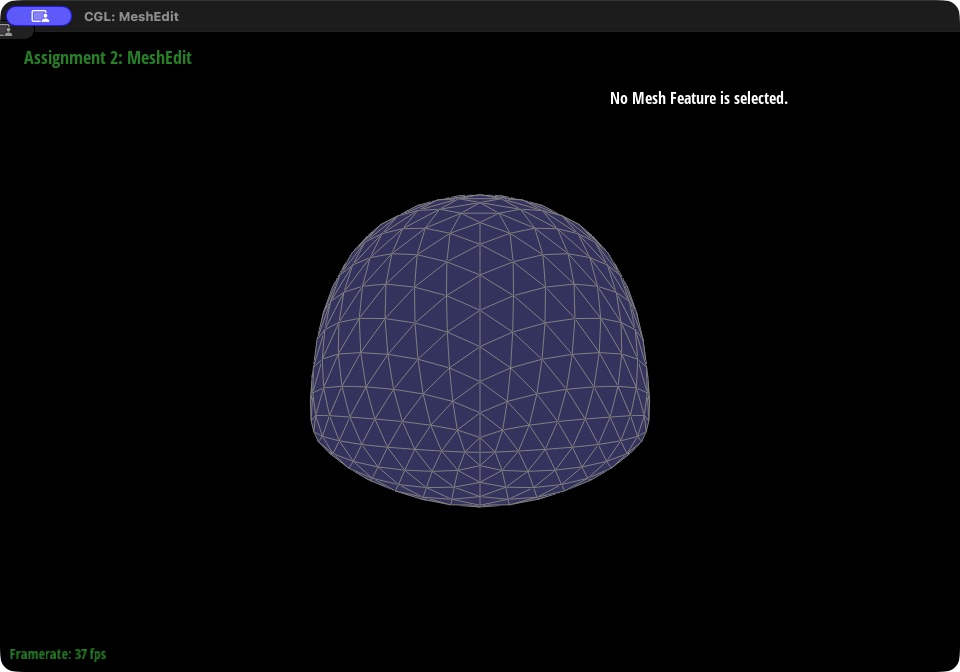
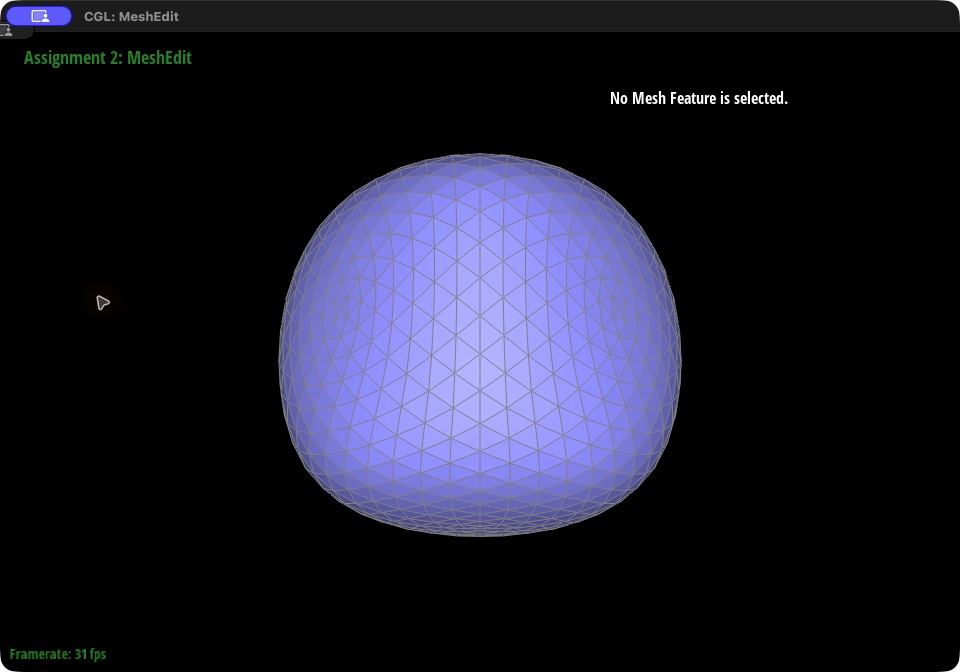
Observations. Each round makes the mesh noticeably smoother. On the teapot, one round divides every triangle into four and makes the bands of facets on the body less pronounced; after two rounds the surface looks smooth, with only faint banding left. The cost is that sharp features do not survive. Because every new position is an average of nearby old positions, corners and edges are pulled inward and rounded off, and the whole shape shrinks slightly each round. The cube shows this most clearly: after three rounds it is no longer a cube but a rounded blob, noticeably smaller than the original.
|
|
|
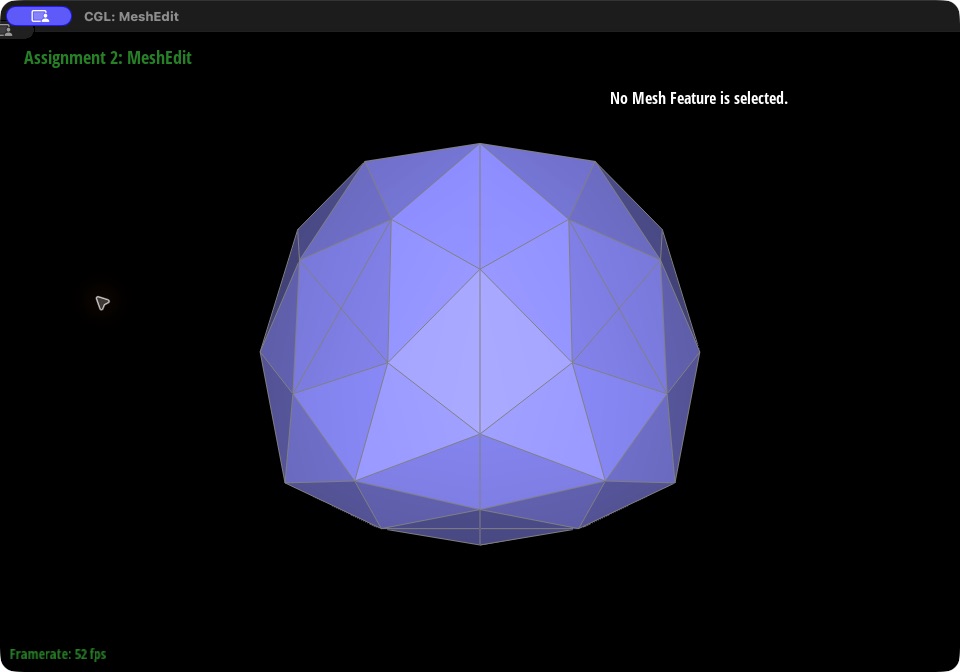
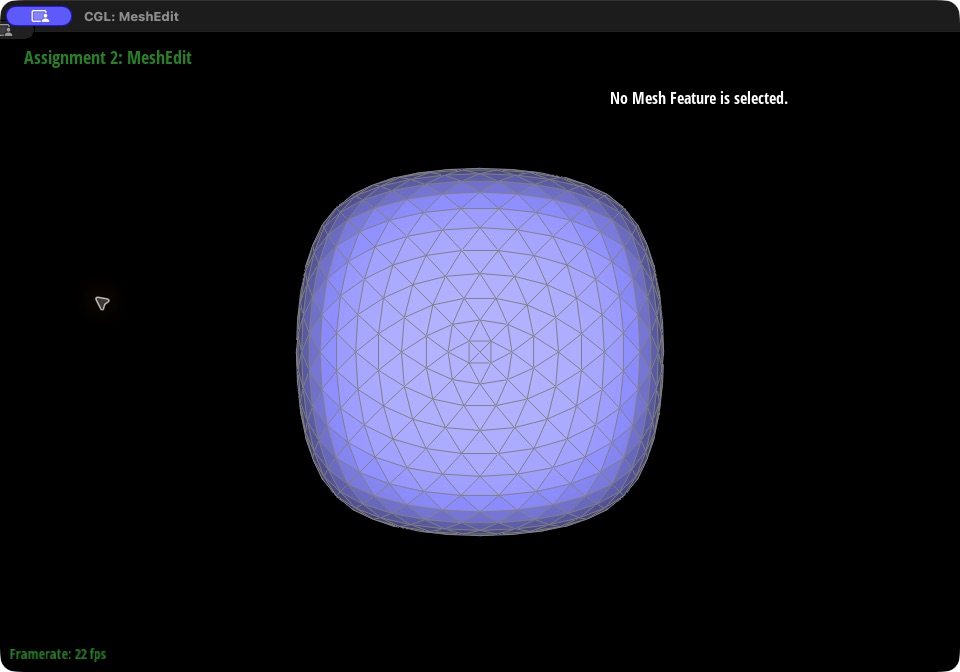
Pre-splitting edges reduces this effect. Splitting edges near a corner or along an edge places more vertices close to that feature, so each average spans a smaller area and the surface is pulled in less there. The cube comparison at the end of this part shows the effect: with every face pre-split, the cube after three rounds keeps flatter faces, a nearly square outline, and tighter corners, and it is visibly larger than the cube subdivided without pre-splitting. It is still rounded, since Loop subdivision always smooths corners to some degree.
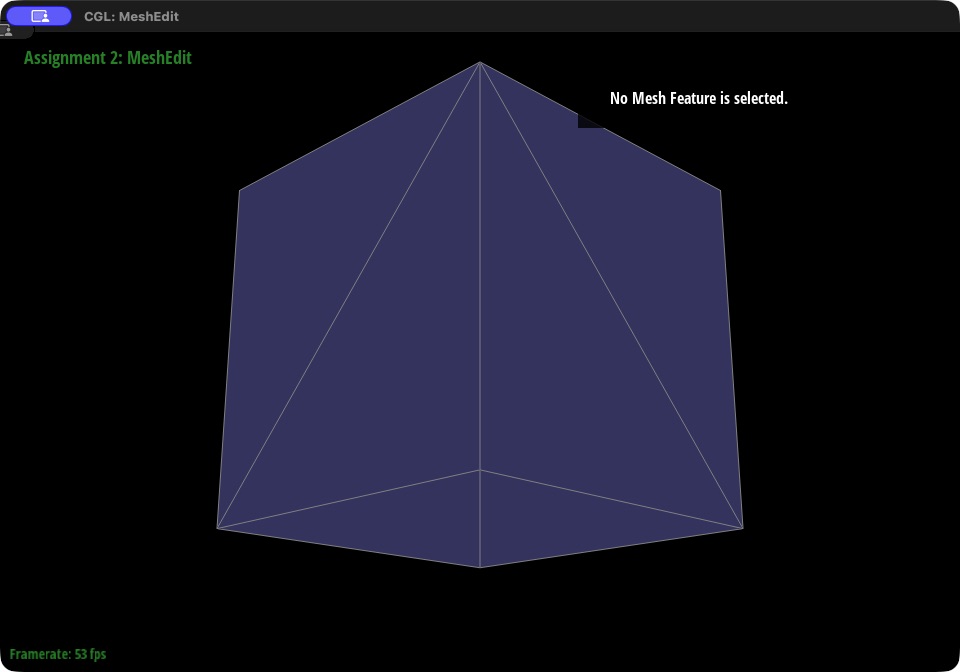
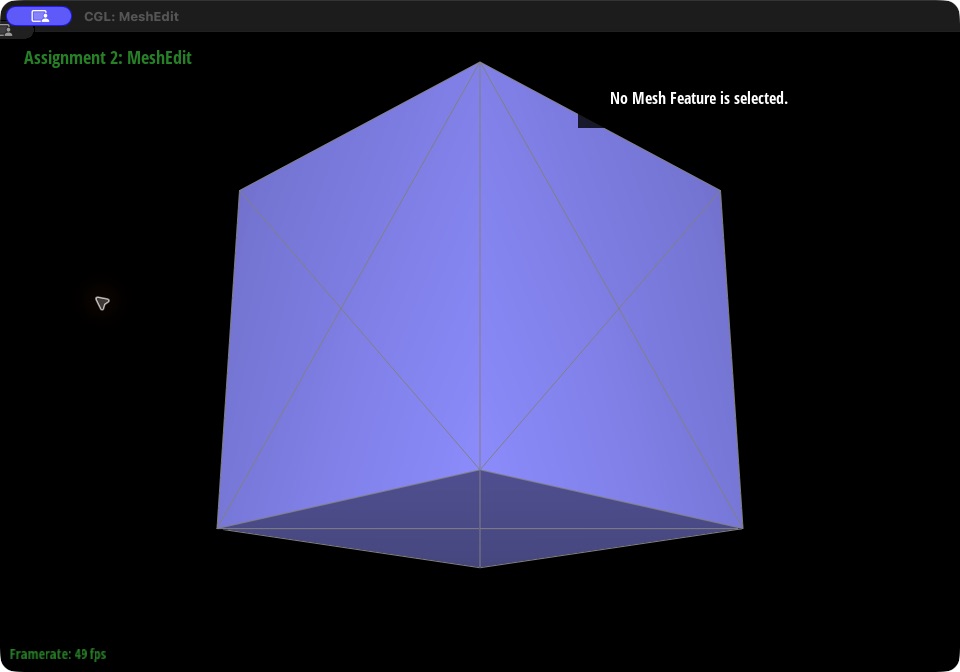
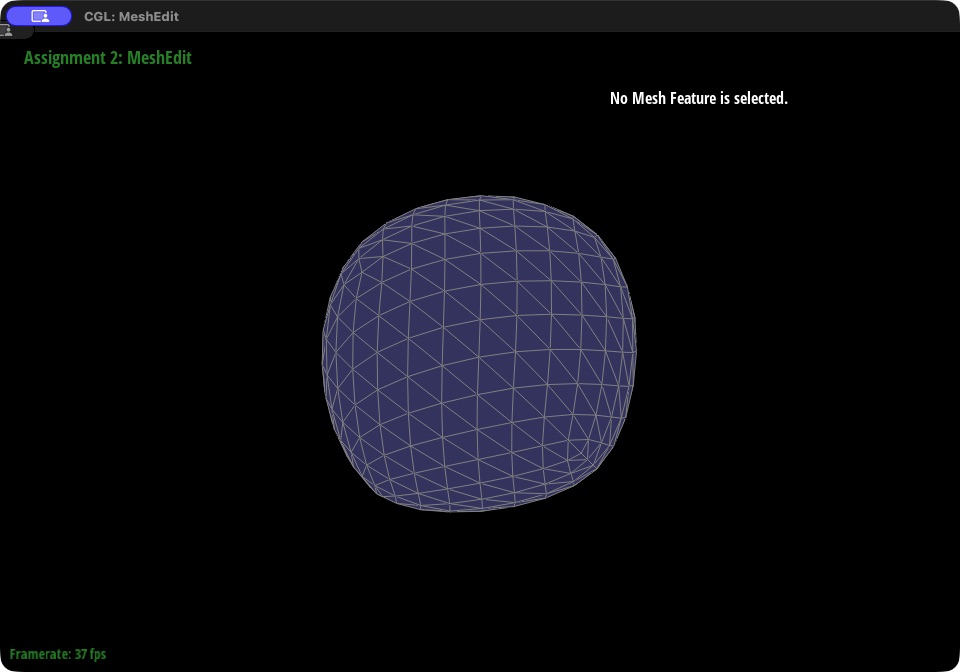
Why the cube becomes asymmetric. In dae/cube.dae, each square face is divided into two triangles along one diagonal, and the diagonals are not arranged symmetrically. As a result, the 8 corners have different degrees: one corner has 3 neighbors, three have 4, three have 5, and one has 6. The old-vertex rule depends on \(n\) through \(u\), so corners with different degrees are pulled toward their neighbors by different amounts, and the edge-vertex rule depends on which diagonal each face uses. The cube's geometry is symmetric but its connectivity is not, and Loop subdivision follows the connectivity. After a few rounds the surface is visibly lopsided, as the front view of the original cube after three rounds shows.
Pre-processing fix. Before subdividing, each of the six face diagonals is split once. Each split adds a vertex at the center of its face and connects it to all four corners of that face, so every face becomes four triangles meeting at its center. The connectivity is now as symmetric as the shape: every corner connects to its 3 cube edges and to the centers of its 3 faces, giving all 8 corners degree 6, and all 6 face centers have degree 4. Because every corner and every face is now equivalent, the subdivision rules treat them identically and the result stays symmetric. A check over all 48 symmetries of the cube confirms this: after three rounds, the largest mismatch between the mesh and any of its rotated or mirrored copies is about 0.19 without pre-processing and about 0.0000013 with it, which is floating-point rounding.
The screenshots below compare the original cube (left) with the pre-split cube (right) before subdivision and after one, two, and three rounds, followed by a front view after three rounds.
|
|
|
|
|
|
|
|
|
|
(Optional) Section III: Potential Extra Credit - Art Competition: Model something Creative
The optional extra credit was not attempted.