CS184/284A Fall 2026 Homework 1 Write-Up
Link to webpage: https://cal-cs184-student.github.io/hw1-aa-writeup/
Link to GitHub repository: https://github.com/cal-cs184-student/hw1-aa
Overview
In this homework I built a software rasterizer for a simplified version of SVG. Starting from triangles given in screen coordinates, it decides which pixels each triangle covers, antialiases the edges by supersampling, places shapes with hierarchical transforms, blends colors across triangles with barycentric coordinates, and maps textures onto them with nearest or bilinear pixel sampling and mipmap level sampling. By the end it renders every provided test scene, including the color wheel, the transformed robot, and the textured maps and photos.
All three kinds of triangles (flat color, interpolated color, and textured) share one traversal. It walks the
supersamples inside the triangle's bounding box, restricted on each row to the span the triangle actually
covers, and tests each one against the triangle's three edges. The only thing that differs between triangle
types is how a covered sample gets its color, so supersampling, the speed optimizations, and the edge rules
apply to all of them automatically. Checked against the 32 provided reference images, 30 match byte-for-byte.
The other two (05_lion.svg and 06_sphere.svg) differ only along their outlines. Those
outlines use stroke-opacity, which the provided SVG parser does not support.
Extra credit completed: a faster triangle rasterizer for Task 1 (per-row spans and hoisted arithmetic), with byte-identical output and timing comparisons, described at the end of the Task 1 section.
What I found most interesting:
- Almost everything is a sampling problem. Deciding whether a pixel is inside a triangle, and looking up a texture, both take a few point samples of a continuous signal. Jagged edges, broken thin triangles, dashed grid lines, and sparkling city lights are all the same failure: aliasing. Each technique fixes it in a different place. Supersampling takes more samples in screen space, bilinear filtering reconstructs the texture between texels, and mipmapping prefilters the texture ahead of time. Measuring them side by side showed how different their costs are: 16× supersampling made rendering 14 to 15 times slower, while mipmaps cost one third more texture memory and roughly doubled the texturing time.
- Floating point makes "equivalent" formulas different. The reference images are compared byte-for-byte, and mathematically identical ways of computing barycentric coordinates or texel positions produced slightly different pixels. I kept every optimization exact (for example, per-row spans only narrow down which samples get the original edge test), and I matched the reference conventions for barycentric coordinates and texel centers precisely.
- Features without reference images need their own tests. Supersampling, bilinear filtering, and mipmaps have no reference images, so I checked them independently. For example, I compared supersampled renders against a higher-resolution render averaged down, and compared computed mipmap levels against values derived from the scene geometry. These checks also exposed a bug in the provided mipmap code: the smallest mip level was never computed and stayed black.
Task 1: Drawing Single-Color Triangles
How I rasterize triangles
By the time a triangle reaches rasterize_triangle, its three vertices \(P_0, P_1, P_2\) are already in
screen space (pixel units, floating point). My rasterizer turns that continuous triangle into a set of covered
pixels in three steps.
- Bounding box. I take the minimum and maximum of the vertices' \(x\) and \(y\) coordinates, round them outward to whole pixels, and clamp the result to the framebuffer. Only pixels inside this box can possibly be covered, so they are the only ones visited; parts of a triangle that fall off screen cost nothing.
- One sample per pixel, at the pixel center. For pixel \((x, y)\) the sample point is \((x + 0.5, y + 0.5)\), not the pixel's corner.
- Three line tests. For the edge from \(P_i\) to \(P_j\), with \(\Delta x_{ij} = x_j - x_i\) and \(\Delta y_{ij} = y_j - y_i\), the line equation \[ L_{ij}(x, y) = (y - y_i)\,\Delta x_{ij} - (x - x_i)\,\Delta y_{ij} \] is the 2D cross product of the edge vector with the vector from \(P_i\) to the sample. It is zero on the line through the edge and has opposite signs on its two sides. A sample is inside the triangle exactly when it lies on the same side of all three edges.
Which sign counts as "inside" depends on the winding order: counter-clockwise and clockwise triangles give
opposite signs. Instead of reordering vertices, I accept a sample when all three values are \(\ge 0\)
or all three are \(\le 0\), so both windings render correctly (svg/basic/test6.svg checks
this). Because the comparisons include equality, a sample lying exactly on an edge counts as inside, so no edge
is left un-rasterized and two triangles that share an edge never leave a crack between them. Every covered pixel
is written with fill_pixel, and resolve_to_framebuffer later converts the stored
colors to 8-bit RGB for display.
Why this is no worse than checking every sample in the bounding box
My basic implementation is the bounding-box algorithm: it visits every pixel inside the triangle's bounding box exactly once and does a constant amount of work per pixel (three line equations and a sign check). Its cost is therefore proportional to the area of the bounding box, and it never scans the whole framebuffer. The bounding box is also clamped to the screen, so it can only shrink.
The optimized version described in the extra credit below goes further: on each row it tests only a sub-range of the bounding box's pixels, and the extra bookkeeping is a constant amount of work per row. Since it tests a subset of the same samples with the same test, it never does more per-sample work than the bounding-box algorithm.
Result: basic/test4.svg
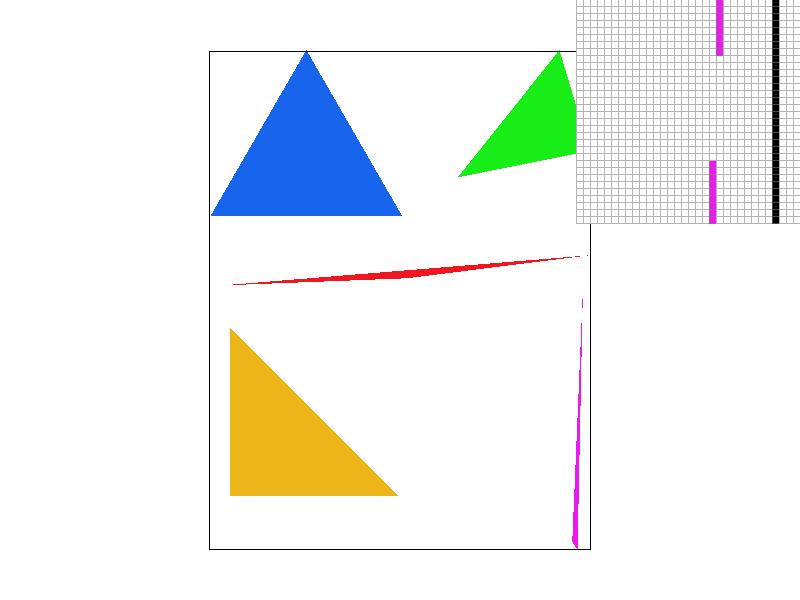
basic/test4.svg with the default view (800 × 600, 1 sample per pixel). The pixel inspector
(top right) is centered on the top of the thin magenta triangle, next to the canvas's right border (the black
vertical line).
The magenta triangle is one continuous shape, but near its top vertex it is narrower than a pixel. With only one sample per pixel, a pixel is filled only if its exact center falls inside the triangle, and most centers there miss it. In the inspector, the triangle shows up as a short isolated run of pixels, then a gap, then the rest of the triangle; the right tip of the thin red triangle breaks into scattered pixels for the same reason. This is aliasing: a single point sample cannot represent geometry smaller than a pixel. Supersampling in Task 2 addresses it.
Extra credit: a faster triangle rasterizer
The reference images are compared byte-for-byte, so I set one hard constraint: the optimized rasterizer must produce exactly the same pixels as the basic one. That ruled out the classic incremental trick of adding a constant to each edge value per pixel, because accumulated floating-point error flips samples that lie right on an edge. Within that constraint I made four changes.
- Per-row spans instead of the full bounding box. On a fixed row \(y_s\), the term \(r_k = (y_s - y_k)\,\Delta x_k\) of edge \(k\)'s line equation is a constant, so the equation is a linear function of the sample's \(x_s\): \[ L_k(x_s) = r_k - (x_s - x_k)\,\Delta y_k. \] The sign of the triangle's signed area tells me which sign means "inside", so each edge's inside condition becomes a half-line, \(x_s \le x_k + r_k / \Delta y_k\) or \(x_s \ge x_k + r_k / \Delta y_k\) depending on the sign of \(\Delta y_k\). Intersecting the three half-lines gives the interval \([lo, hi]\) that the triangle covers on that row, and I only test pixels in that interval. A horizontal edge (\(\Delta y_k = 0\)) either accepts or rejects the entire row, so rejected rows are skipped without testing any pixel.
- Exact results despite rounding. The span only decides which pixels to test. I pad it by one pixel on each side, and every pixel in it still goes through the original three line tests, so rounding error in \(lo\) or \(hi\) can never add or drop a sample. Degenerate triangles (zero area) have no meaningful inside sign, so they fall back to the plain bounding-box scan and behave exactly as before.
- Hoisting loop-invariant work. The edge vectors \(\Delta x_k, \Delta y_k\) are computed once per triangle, and the \(y\)-only term \(r_k\) once per row, leaving one subtraction, one multiplication and one more subtraction per edge in the inner loop. Writing \(-ab + r\) as \(r - ab\) is bit-for-bit identical in IEEE floating point, so this does not change the output either.
-
Cheaper setup. The bounding box is clamped in floating point before converting to integers, so vertices
far off screen cannot overflow an
int, and triangles that are entirely off screen return immediately.
To check correctness, I rendered all 32 provided SVGs plus 8 randomly generated stress scenes with both versions and compared the PNG files byte-for-byte: all 40 were identical. The stress scenes target the risky cases: 3000 random triangles of both windings, 3000 long slivers, 3000 degenerate triangles (collinear or repeated vertices), vertices on integer and half-integer coordinates (so edges pass exactly through sample points), sub-pixel triangles, and huge triangles reaching \(\pm 10^6\) pixels. The provided reference tests that passed before still pass.
Timings are the average of 20 consecutive svg.draw() calls in DrawRend::redraw()
(measured with std::chrono::high_resolution_clock), median of 3 runs; Release build (MSVC
/O2) on an Intel Core i9-12900H, 1024 × 1024 framebuffer, 1 sample per pixel.
| Scene | Basic (ms) | Optimized (ms) | Speedup |
|---|---|---|---|
basic/test3.svg | 8.75 | 4.29 | 2.0x |
basic/test4.svg | 0.44 | 0.23 | 1.9x |
illustration/04_sun.svg | 4.83 | 1.73 | 2.8x |
subdiv/triangle7.svg | 4.90 | 1.03 | 4.7x |
hardcore/02_degenerate_square2.svg | 529.5 | 14.5 | 36.4x |
| 400 random large triangles | 114.3 | 41.0 | 2.8x |
| 3000 thin slivers | 368.1 | 21.3 | 17.3x |
| 400 thin diagonal triangles | 429.6 | 8.8 | 48.7x |
| 3000 sub-pixel triangles | 0.75 | 0.80 | 0.9x |
The speedup tracks how much of a triangle's bounding box is empty. A typical large triangle covers roughly half of
its box, so skipping the empty half (together with the hoisting) gives about 2–3x on the provided
illustrations and on random large triangles. Long thin triangles are the extreme case:
02_degenerate_square2.svg is a fan of 1000 slivers from one corner of the canvas, each only
one SVG unit wide at its far end but with a bounding box that can cover most of the canvas, so almost every
sample in those boxes is wasted by the basic version; the span version is 36x faster, and thin diagonal triangles reach almost 50x. The one case with no gain is sub-pixel
triangles: their bounding box is only one or two pixels, there is nothing to skip, and the per-row span setup
costs slightly more than it saves.
Task 2: Antialiasing by Supersampling
Why supersampling
With one sample per pixel, every pixel is all-or-nothing: it takes the triangle's color if its center is covered and stays white otherwise. That produces jagged edges, and geometry thinner than a pixel can fall between pixel centers and vanish or break apart (the magenta triangle in Task 1). The underlying problem is aliasing: a triangle edge is a sharp step, which contains arbitrarily high frequencies, and one sample per pixel cannot represent them.
Ideally a pixel's color would be the average of the scene over the pixel's area, i.e. the fraction of the pixel the triangle covers. Supersampling approximates that integral numerically: take several samples inside each pixel and average them. This amounts to low-pass (box) filtering the image before it is sampled at pixel resolution, so edges get intermediate shades in proportion to coverage instead of hard stair steps.
My algorithm and data structures
I treat supersampling as rendering a higher-resolution image and then downsampling it. With a sample rate of
\(n^2\) (1, 4, 9 or 16), each pixel holds an \(n \times n\) grid of samples, and sample_buffer stores
all of them as one image of \((n \cdot \text{width}) \times (n \cdot \text{height})\) Color values,
row by row. Supersample \((i, j)\) of that image sits at
\[ \left( \frac{i + 0.5}{n},\ \frac{j + 0.5}{n} \right) \]
in pixel units, i.e. at the centers of an evenly spaced \(n \times n\) grid inside pixel
\((\lfloor i/n \rfloor, \lfloor j/n \rfloor)\). With \(n = 1\) this is exactly the pixel center from Task 1.
I changed four parts of the pipeline:
-
Buffer management.
sample_buffernow has \(\text{width} \times \text{height} \times \text{sample rate}\) entries. Bothset_sample_rate(the-/=keys) andset_framebuffer_target(window resize) resize it, andclear_buffersresets every sample to white at the start of each frame. -
Triangle rasterization.
rasterize_triangleruns the same algorithm as in Task 1, but over supersamples instead of pixels: it walks the rows of supersamples inside the triangle's bounding box, tests each supersample with the three line equations, and writes the triangle's color into the covered ones. The per-row span optimization from Task 1 carries over unchanged, now measured in supersamples. -
Points and lines. These are not antialiased.
fill_pixelnow writes the color into all \(n^2\) supersamples of the pixel, so a point or line pixel resolves to exactly its color and the canvas border stays solid black at every sample rate. -
Resolving. After all elements are drawn,
resolve_to_framebufferaverages each pixel's \(n^2\) supersamples (a box filter) and converts the result to 8-bit RGB. I accumulate the sum indouble, which is exact for up to 16 samples, so a pixel whose samples all share one color averages back to exactly that color. Summing infloatcould instead produce, say, 0.19999 for a solid 0.2, which the 8-bit conversion would round down to the next lower level. I also clamp to \([0, 1]\) before converting.
The cost is memory and time proportional to the sample rate. At 16 samples per pixel an 800 × 600 window stores
7.68 million samples, about 92 MB at 12 bytes per Color, and every triangle tests up to 16 times as many
samples. Storing the full supersample buffer is what makes overlapping and adjacent triangles correct: each sample
simply keeps the color of the last triangle that covered it.
To check correctness, I used the fact that the view scales with the window size: rendering at 256 × 256 with 16 samples per pixel places samples at exactly the same points as rendering at 1024 × 1024 with 1 sample per pixel and averaging each 4 × 4 block. Across 10 test scenes at sample rates 4 and 16, the two differed only by 8-bit rounding (about one level at most), apart from the pixels on stroked outlines, which are expected to differ because lines are not supersampled. With 1 sample per pixel the output is byte-identical to Task 1, so all reference tests that passed before still pass.
Results: basic/test4.svg at 1, 4 and 16 samples per pixel
All three screenshots use the default view (800 × 600) with the pixel inspector at the same spot: the top of the thin magenta triangle, next to the canvas's right border.
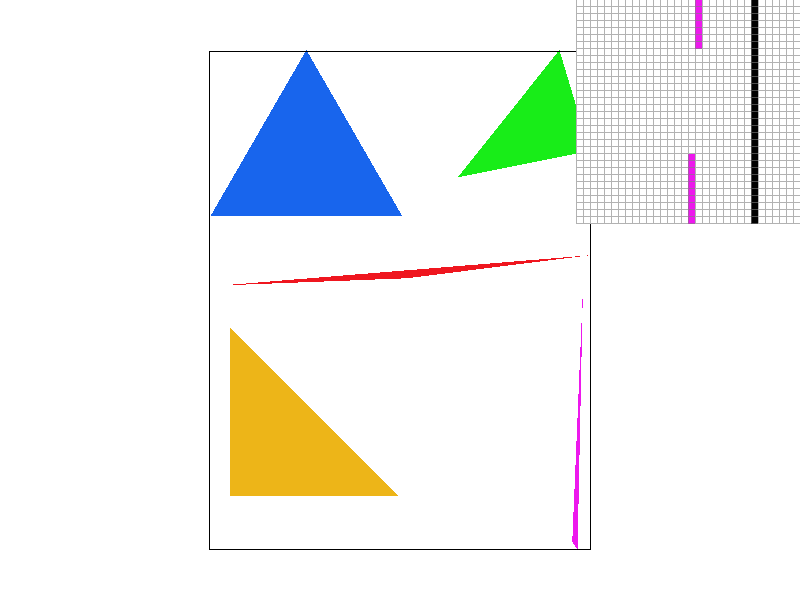 |
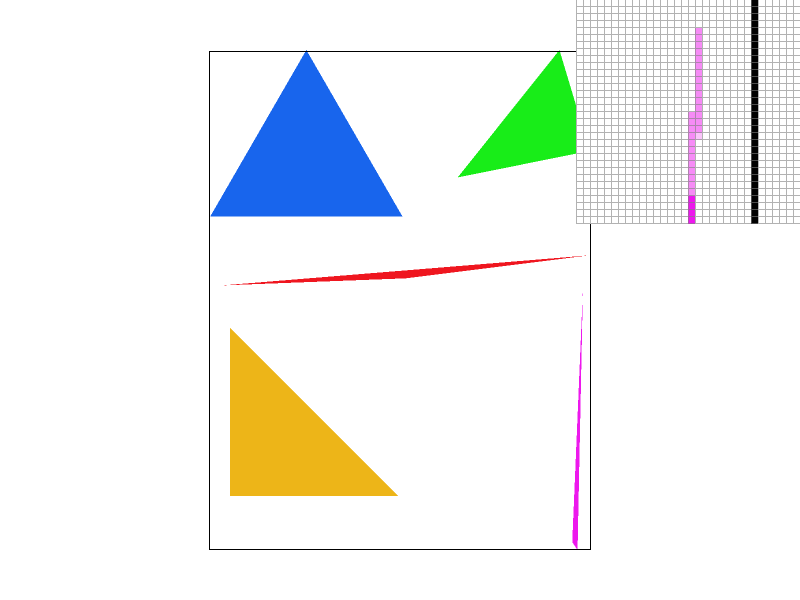 |
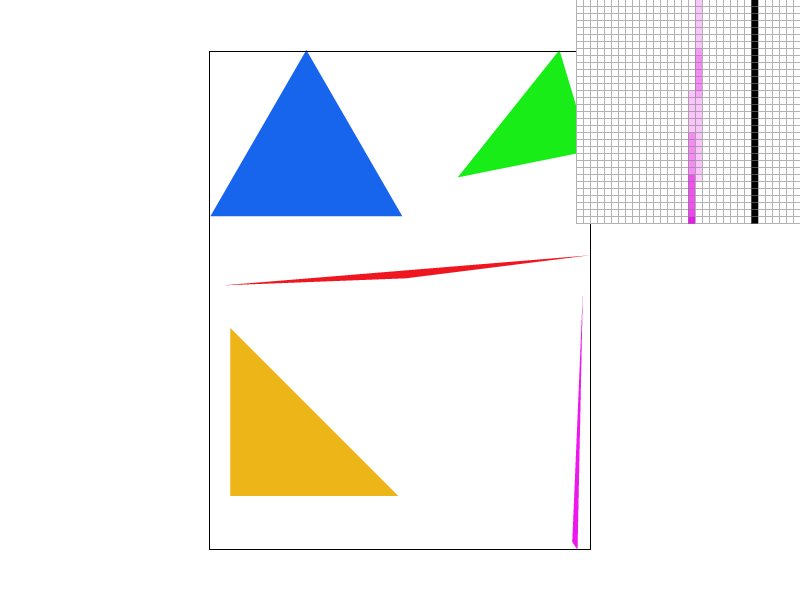 |
|
|
|
Top row: the full screenshots. Bottom row: the pixel-inspector region of the same screenshots, enlarged on this page (display cropping only; the image files are unmodified).
1 sample per pixel. Near its top vertex the magenta triangle is narrower than a pixel, so whether a pixel is filled depends only on whether its center happens to land inside. The result is fully saturated pixels separated by a gap: the triangle falls apart.
4 samples per pixel. The gap closes. Pixels that the triangle only partly covers now have some, but not all, of their 4 samples inside and come out as lighter pink, so the thin tip becomes a continuous but faint line. The shading is coarse, though: with 4 samples a pixel can only take 5 levels of coverage (0, 1/4, …, 1), which shows up as blocky steps along the tip.
16 samples per pixel. The tip becomes a smooth gradient that fades out toward the vertex as the triangle gets thinner. With 17 possible coverage levels the shade tracks the true covered area much more closely. The same happens at the right tip of the red triangle, which is continuous at 16 samples per pixel instead of breaking into scattered pixels.
These results are what box-filtered supersampling predicts: each pixel's color converges to the fraction of its area the triangle covers. More samples per pixel means a finer estimate of that fraction, so thin features that single-sample rendering drops entirely are recovered as partially covered, lighter pixels.
Task 3: Transforms
Implementing the transforms
SVG transforms act on 2D points, but a translation is not a linear map in 2D, so it cannot be written as a
\(2 \times 2\) matrix. Homogeneous coordinates fix this: a point \((x, y)\) becomes \((x, y, 1)\), and all three
transforms become \(3 \times 3\) matrices that compose by matrix multiplication. Following the SVG spec, I
implemented
\[ T(d_x, d_y) = \left[\begin{array}{ccc} 1 & 0 & d_x \\ 0 & 1 & d_y \\ 0 & 0 & 1 \end{array}\right], \]
\[ S(s_x, s_y) = \left[\begin{array}{ccc} s_x & 0 & 0 \\ 0 & s_y & 0 \\ 0 & 0 & 1 \end{array}\right], \]
\[ R(\theta) = \left[\begin{array}{ccc} \cos\theta & -\sin\theta & 0 \\ \sin\theta & \cos\theta & 0 \\ 0 & 0 & 1 \end{array}\right], \]
where rotate takes \(\theta\) in degrees and converts it to radians. Rotating about a point
\((c_x, c_y)\), as in rotate(a cx cy), is handled by the parser as
\(T(c_x, c_y)\,R(a)\,T(-c_x, -c_y)\). With these in place, svg/transforms/robot.svg (and the other
test files that use transforms, such as 09_kochcurve.svg) match the reference images exactly.
One detail matters when writing SVG by hand: screen space has \(y\) pointing down, so the same matrix that rotates counterclockwise in standard math coordinates appears to rotate clockwise on screen. To raise an arm on screen I therefore use negative angles.
My cubeman: waving hello


my_robot.svg, rendered with 16 samples per pixel (800 × 600).
I wanted cubeman to greet the viewer: one arm raised and waving, the other hanging relaxed, and his head tilted toward the waving hand with a small smile. The yellow block is his hand, and the thin arcs on either side of it follow the path the hand sweeps around the elbow, to suggest motion. I kept the original red body and proportions so the change in pose stands out.
To make the pose, I restructured the arms from robot.svg into joint hierarchies. In the original file
each arm segment is placed with a translation only, which is enough for a straight T-pose but not for bending at
a joint. In my_robot.svg every joint is its own group: the group first translates the origin to the
joint, then rotates, and the segment and everything attached further down the arm are children of that group.
The raised arm looks like this (the polygons are omitted):
<g transform="translate(50 -40)">  <!-- shoulder -->
  <g transform="rotate(-40)">      <!-- raise arm -->
    upper arm
    <g transform="translate(75 0)"> <!-- elbow -->
      <g transform="rotate(-70)">   <!-- bend up -->
        forearm, hand, arcs
      </g>
    </g>
  </g>
</g>
Because transforms compose down the hierarchy, a point on the forearm is transformed by \[ T_{\text{body}}\,T_{\text{shoulder}}\,R(-40^\circ)\,T_{\text{elbow}}\,R(-70^\circ). \] The forearm ends up rotated by \(-110^\circ\) in total and stays attached to the upper arm at the elbow, even though I only wrote two small local rotations. The hand and the motion arcs live inside the forearm's group, so they follow it automatically. The relaxed arm uses the same structure with \(-75^\circ\) at the shoulder and \(-20^\circ\) at the elbow, and the head is rotated \(10^\circ\) about the neck, with the eyes and mouth inside the head's group so they tilt with it.
Task 4: Barycentric coordinates
What barycentric coordinates are
Barycentric coordinates describe a point by how much each of a triangle's vertices "pulls" on it. Any point \(P\) in the plane of triangle \(ABC\) can be written as a weighted average of the three vertices, \[ P = \alpha A + \beta B + \gamma C, \qquad \alpha + \beta + \gamma = 1, \] and the weights \((\alpha, \beta, \gamma)\) are its barycentric coordinates. \(P\) lies inside the triangle exactly when all three weights are non-negative. A vertex's weight is 1 at that vertex, 0 everywhere on the opposite edge, and changes linearly in between, so moving toward a vertex increases its weight.
A convenient way to see the weights is through areas. Connecting \(P\) to the three vertices splits the triangle into three smaller triangles, and each vertex's weight is the area of the sub-triangle opposite it, divided by the area of the whole triangle. As \(P\) approaches \(A\), the sub-triangle \(PBC\) grows to fill the whole triangle and \(\alpha\) approaches 1.
Because the weights say how close a point is to each vertex, they are exactly what is needed to blend values that are only known at the vertices. For any per-vertex attribute \(V\) (a color here, texture coordinates in Task 5), \[ V(P) = \alpha V_A + \beta V_B + \gamma V_C \] varies smoothly across the triangle and matches the given value at each vertex.
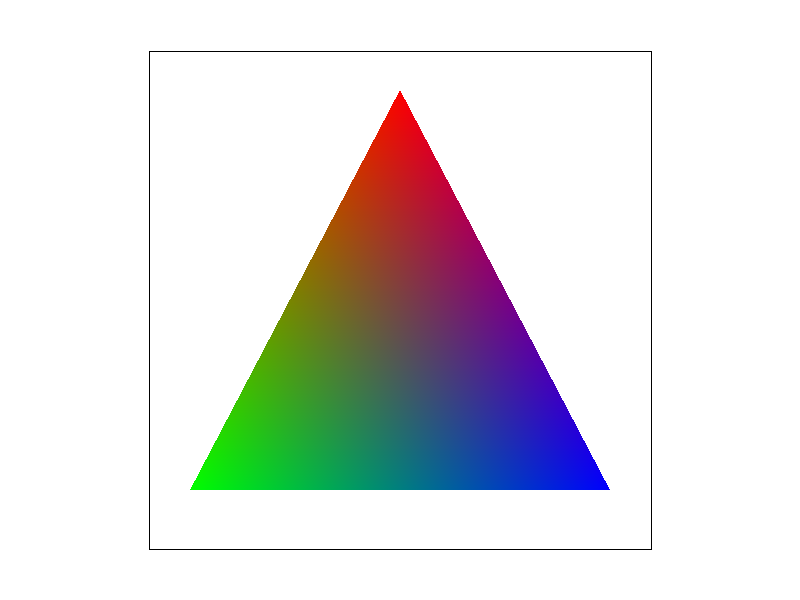

rgb_triangle.svg: one triangle with a pure red, green and blue
vertex (default view, 1 sample per pixel).
With vertex colors \((1,0,0)\), \((0,1,0)\) and \((0,0,1)\), a pixel's color \((r, g, b)\) is its barycentric coordinate triple \((\alpha, \beta, \gamma)\), so this image is a direct picture of the coordinates. Each corner is a pure color because one weight is 1 there. Along the bottom edge the red weight is 0, so only green and blue mix. At the centroid all three weights equal \(1/3\), so the color there is a neutral dark gray: the screenshot measures \((83, 85, 86)\) at that pixel, close to the ideal \((85, 85, 85)\).
How I implemented it
The triangle traversal from Tasks 1 and 2 (bounding box, per-row spans, supersamples, three line tests) is now
a single shared function. For every covered sample it calls a small per-triangle function to get that sample's
color. rasterize_triangle passes one that always returns its flat color, and
rasterize_interpolated_color_triangle passes one that interpolates. After the refactor, every
flat-colored test scene still renders byte-identically to before.
Computing the weights is nearly free, because the inside test already evaluates each edge's line equation at the sample. The line equation \(L_{BC}\) of edge \(BC\) is 0 on that edge and changes linearly, exactly like \(\alpha\), so dividing by its value at the opposite vertex normalizes it: \[ \alpha = \frac{L_{BC}(P)}{L_{BC}(A)}, \qquad \beta = \frac{L_{CA}(P)}{L_{CA}(B)}, \] \[ \gamma = 1 - \alpha - \beta. \] The two denominators are computed once per triangle, and each sample's color is then \(\alpha\,c_A + \beta\,c_B + \gamma\,c_C\). Since the interpolation happens per supersample, supersampling from Task 2 works unchanged: each supersample gets its own interpolated color, and resolving averages them. A degenerate triangle (zero area) has no well-defined weights and is skipped.
Several mathematically equivalent ways to compute these weights round differently in floating point, and
the reference images are compared byte-for-byte. The formula above, which is the one from lecture, matched the
reference for test7.svg on all but one of its roughly one million pixels, and that pixel differs by a
single color level (129 vs. 130).
Result: basic/test7.svg
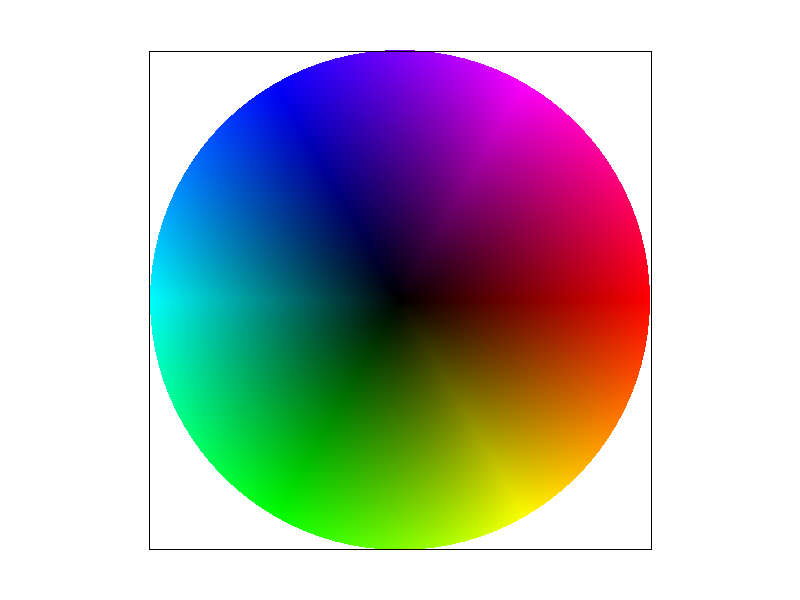
basic/test7.svg with the default view and 1 sample per pixel.The color wheel is a fan of 96 thin triangles around the center. Each triangle has a black vertex at the center and two vertices on the rim colored with neighboring hues, so barycentric interpolation blends from black at the center out to saturated colors at the rim, and between neighboring hues around the rim. Faint radial lines are visible where adjacent triangles meet: interpolation is linear within each triangle, so the wheel's smooth hue change is approximated piecewise, and the approximation shows along the triangle boundaries.
Task 5: "Pixel sampling" for texture mapping
What pixel sampling is
Texture mapping gives each triangle vertex a texture coordinate \((u, v)\) into an image, the texture. For every screen sample inside the triangle I interpolate \((u, v)\) with the barycentric coordinates from Task 4, which tells me where in the texture that sample lands. That point is continuous, but the texture is a discrete grid of colored texels, so the point usually falls between texel centers. Pixel sampling is the rule for turning that continuous position into a color by reconstructing the texture between its texels.
- Nearest. Use the single texel whose center is closest to the sample. It is cheap (one texel read), but the texture is effectively a grid of flat squares: magnified textures look blocky, and features narrower than a texel can be skipped entirely.
- Bilinear. Blend the four texels around the sample. With fractional offsets \(s, t \in [0, 1)\) from the top-left of those four texel centers, it takes two horizontal lerps and one vertical lerp: \[ c_{\text{top}} = (1 - s)\,c_{00} + s\,c_{10}, \] \[ c_{\text{bottom}} = (1 - s)\,c_{01} + s\,c_{11}, \] \[ c = (1 - t)\,c_{\text{top}} + t\,c_{\text{bottom}}. \] It costs four texel reads, and the reconstructed texture is continuous, so colors change smoothly between texel centers instead of jumping at texel borders.
How I implemented it
rasterize_textured_triangle reuses the shared traversal from Task 4. For each covered sample it
computes the barycentric coordinates, interpolates \((u, v)\), stores it in a SampleParams together
with the current pixel and level sampling modes, and returns tex.sample(sp). For now,
Texture::sample always uses the full-resolution level 0 and dispatches on the pixel sampling mode;
Task 6 adds the mipmap level.
Both samplers place texel \(i\) of a \(w\)-texel-wide level at \(u = i / (w - 1)\), so \(u = 0\) and \(u = 1\) hit
the centers of the first and last texel. Nearest rounds \(u\,(w - 1)\) and \(v\,(h - 1)\) to the closest integer.
Bilinear takes the floor of the same scaled position as the top-left texel and the fractional part as \((s, t)\).
Neighbors past the edge are clamped to the border texel. With this convention all six textured reference images
(basic/test8.svg and svg/texmap/*) match byte-for-byte. I also made both samplers check
that the requested mipmap level exists before indexing it, rather than after.
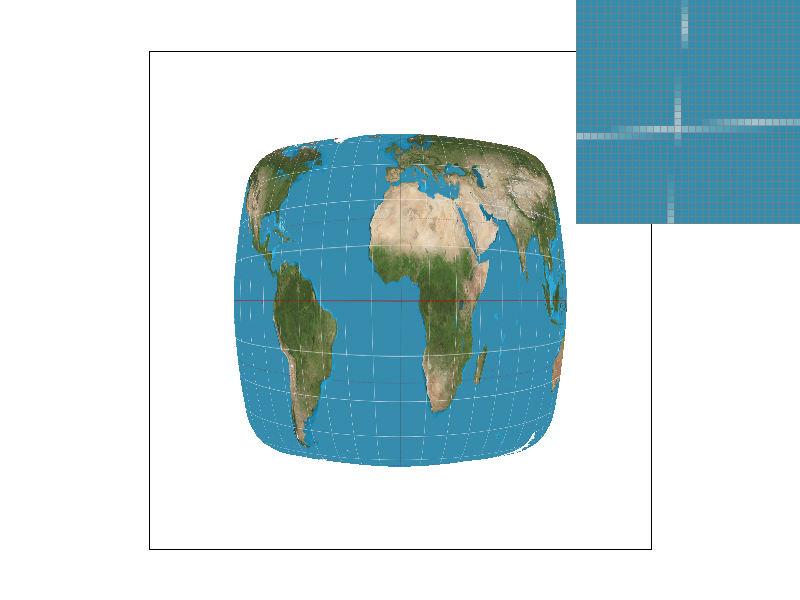
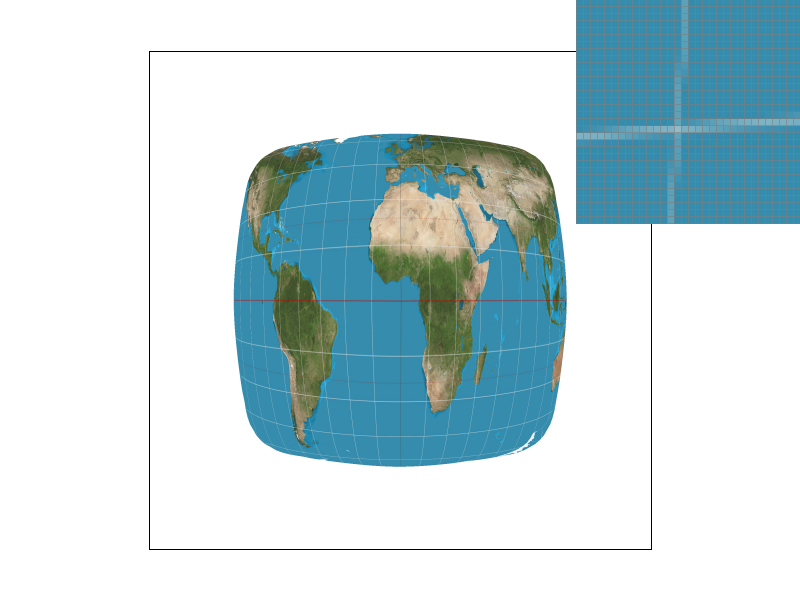
Comparison: nearest vs. bilinear, 1 vs. 16 samples per pixel
All four screenshots are svg/texmap/test1.svg with the default view (800 × 600) and the pixel
inspector at the same spot: a crossing of two grid lines in the ocean west of Africa. The world map texture is
2058 × 1036 texels, and the visible part is drawn about 330 pixels wide and tall, so each screen pixel
covers roughly 4.6 texels horizontally and 2.3 vertically. The texture is being minified, and the grid
lines are only about one texel wide.
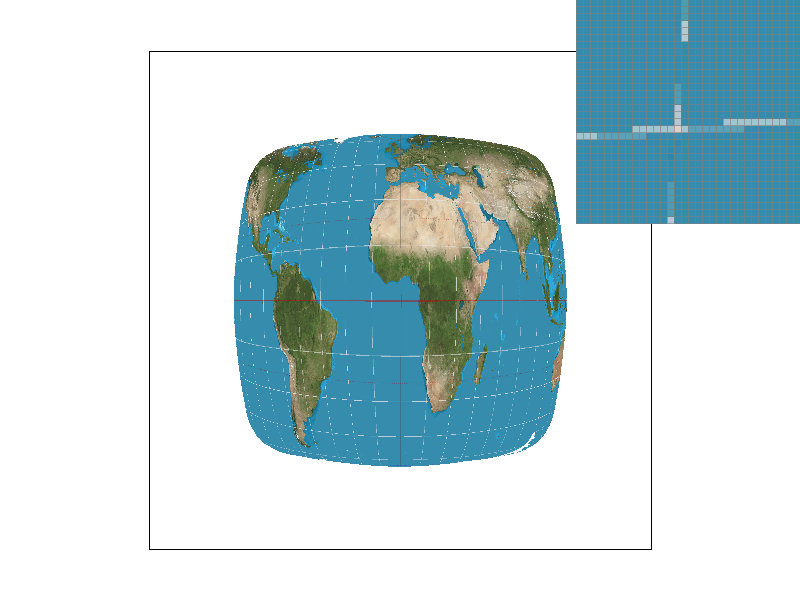 |
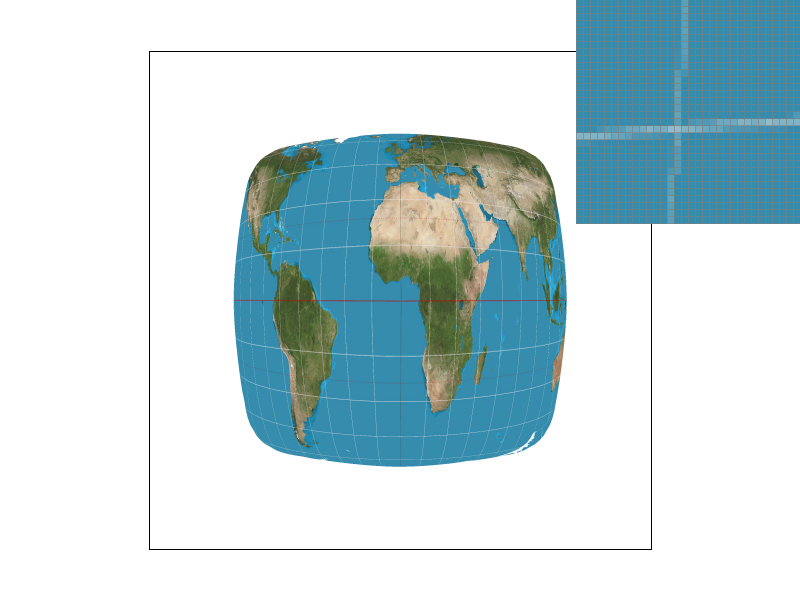 |
|
|
 |
 |
|
|
Each pair shows the full screenshot and, below it, the pixel-inspector region of the same screenshot enlarged on this page (display cropping only; the image files are unmodified).
- Nearest, 1 sample per pixel. The grid lines break into disconnected bright white segments with gaps. Each pixel reads one texel out of the several it covers, so a one-texel-wide line is hit on some pixels and missed on others.
- Bilinear, 1 sample per pixel. The lines are much more continuous. Each pixel now blends the four texels around its sample, so a pixel near a line picks up part of the line's color even when its sample does not land exactly on it. The brightness still varies along the line, because four texels do not cover a pixel's whole footprint of about 4.6 × 2.3 texels.
- Nearest, 16 samples per pixel. The lines become continuous and fainter. Sixteen samples spread over the pixel read sixteen different texels, and averaging them approximates the fraction of the pixel the line covers.
- Bilinear, 16 samples per pixel. This is the smoothest and most even result: supersampling covers the pixel's footprint, and bilinear smooths each individual sample.
Supersampling and bilinear filtering attack the same problem at different scales. Supersampling takes more samples in screen space, while bilinear filtering makes each sample read a smoother version of the texture. With 16 samples per pixel, the gap between nearest and bilinear becomes much smaller, because the averaging over many samples already hides most of nearest's errors. Measured over the whole map in these screenshots, the mean per-pixel difference between the two methods drops from 2.26 color levels at 1 sample per pixel to 0.78 at 16.
The two methods differ most when the texture is magnified, with one texel covering several pixels. Nearest then shows each texel as a visible flat square with hard edges, while bilinear produces smooth gradients between texel centers. They also differ, as here, when the texture has sharp features about one texel wide and each pixel covers only a few texels, because bilinear picks up features that nearest steps over. They differ little when the texture is smooth (low-frequency), since neighboring texels are then similar and blending changes almost nothing. They also both fail when the texture is strongly minified. If a pixel covers dozens of texels, reading just one or four of them is still a tiny sample of the pixel's footprint, so both alias. Fixing that requires pre-filtered, lower-resolution textures, which is the mipmapping of Task 6.
Task 6: "Level Sampling" with mipmaps for texture mapping
What level sampling is
Pixel sampling (Task 5) reads one or four texels per sample. That works when a screen pixel covers about one texel, but when a texture is minified, a single pixel's footprint can span many texels. Reading one or four of them then samples the texture far below its own resolution, so fine detail aliases into noise and sparkle. Ideally the pixel would get the average of every texel under its footprint, but computing that per sample is expensive.
A mipmap precomputes those averages. Level 0 is the full-resolution texture, and each further level halves the width and height by averaging blocks of the previous level, so one texel of level \(k\) summarizes a \(2^k \times 2^k\) block of level 0. Level sampling picks, for each sample, the level whose texels are about as large as the pixel's footprint, so that a single lookup already approximates the area average.
The footprint comes from how fast the texture coordinates change across the screen. If moving one pixel in \(x\) or \(y\) moves the texture position by the vectors \(\partial(u,v)/\partial x\) and \(\partial(u,v)/\partial y\), measured in texels of level 0, then the footprint is about \[ L = \max\left( \left\| \frac{\partial (u,v)}{\partial x} \right\|,\ \left\| \frac{\partial (u,v)}{\partial y} \right\| \right) \] texels wide, and the matching level is \(D = \log_2 L\). The three level sampling modes use \(D\) differently:
L_ZERO: ignore \(D\) and always sample level 0 (Task 5's behavior).L_NEAREST: round \(D\) and sample that single level.-
L_LINEAR: sample levels \(\lfloor D \rfloor\) and \(\lfloor D \rfloor + 1\) and blend them by the fractional part of \(D\). Combined with bilinear pixel sampling this is trilinear filtering.
How I implemented it
In rasterize_textured_triangle, besides the texture coordinates at the sample \((x, y)\), I compute
them at \((x + 1, y)\) and \((x, y + 1)\) and store all three in SampleParams. The line equations are
linear, so moving one pixel changes each of them by a constant (\(-\Delta y\) of the edge for a step in \(x\),
\(+\Delta x\) for a step in \(y\)). That gives the neighbors' barycentric coordinates without re-evaluating
the equations. Texture::get_level subtracts to get the two difference vectors, scales them by the
full-resolution width and height to measure them in texels, and returns \(\log_2\) of the longer one.
Texture::sample then chooses the level (or pair of levels) by lsm, clamps it to the
levels that exist, and samples each level with nearest or bilinear pixel sampling. A degenerate footprint, which
gives an undefined level, falls back to level 0.
To check the level computation, I derived the exact level from the SVG geometry of texmap/test1.svg
at seven screen positions and compared it with the level my code computes there (rendered as grayscale). They
agreed to within the precision of the 8-bit visualization, for example 1.49 vs. 1.44 at the center of the map and
2.62 vs. 2.57 near its edge.
A bug in the starter code. generate_mips allocates every mipmap level, but its loop stopped one
level short, so the smallest level (1 × 1) was never computed and stayed black. Printing the average
value of each level confirmed it: for the parrot texture the last level averaged 0.0, while the level above it
averaged 102.6. Strongly minified surfaces that reach that level would therefore have faded toward black. I fixed
the loop bound, and the last level now averages 102.0, in line with the others.
My image and scene
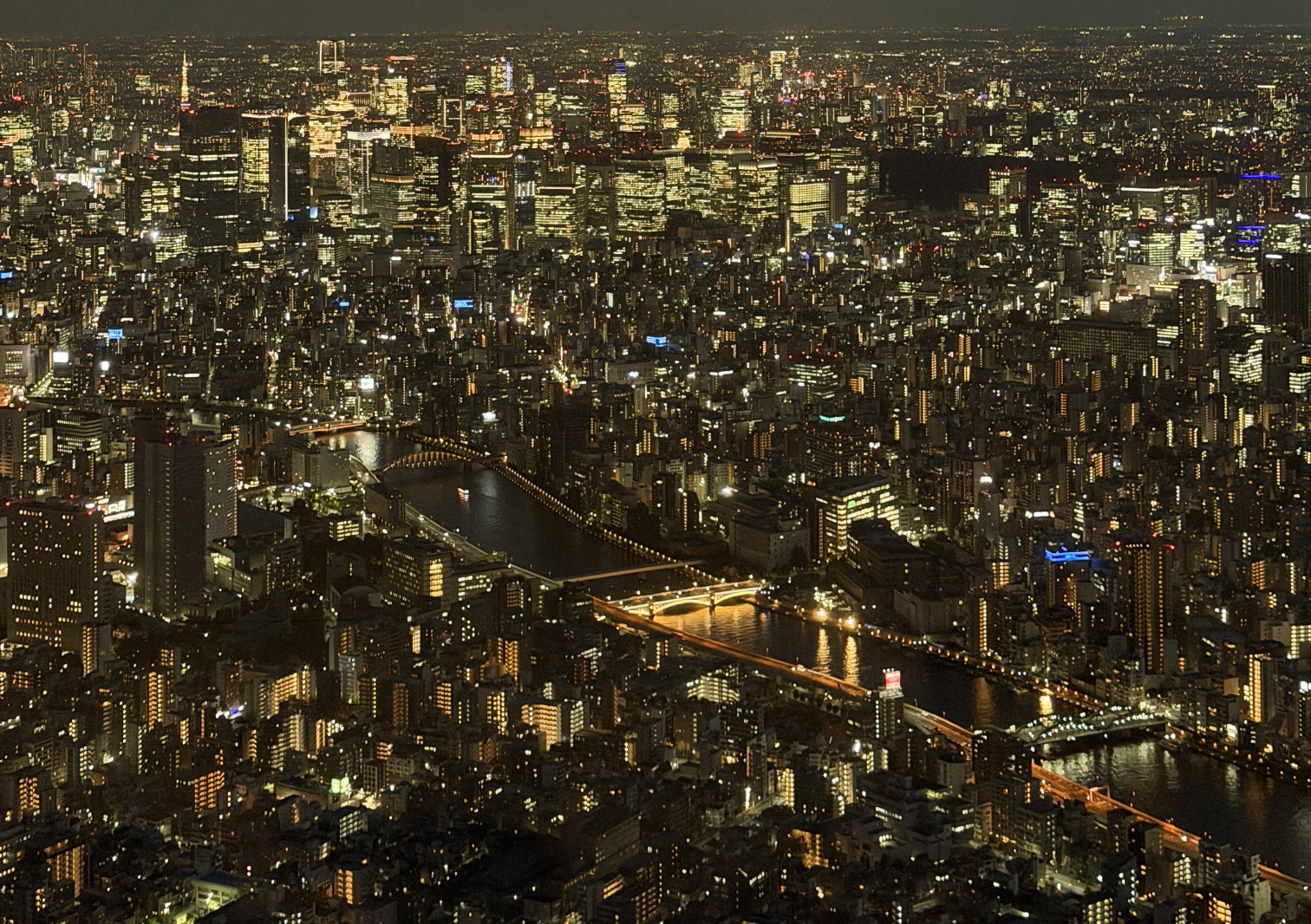
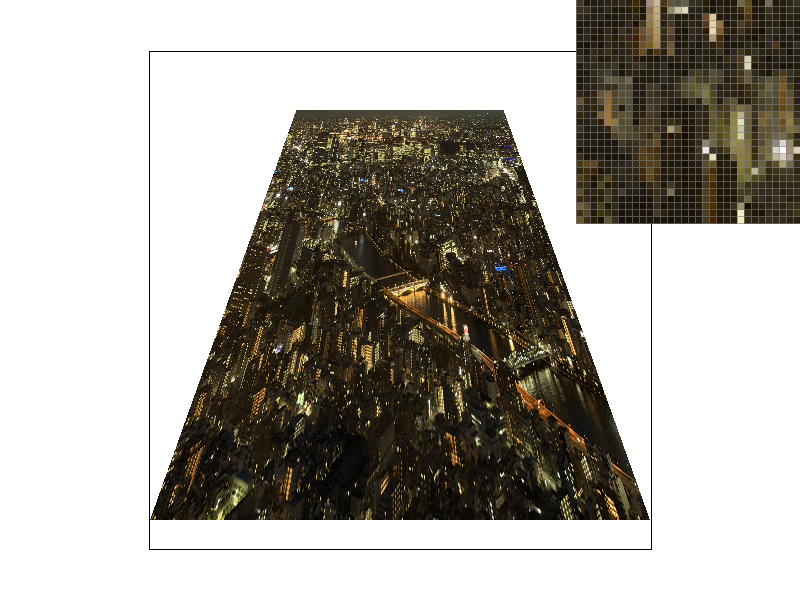
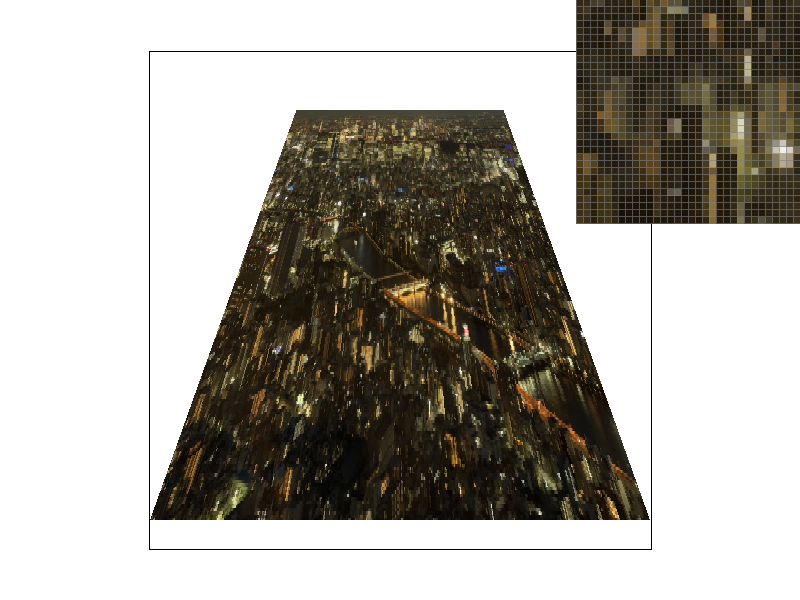
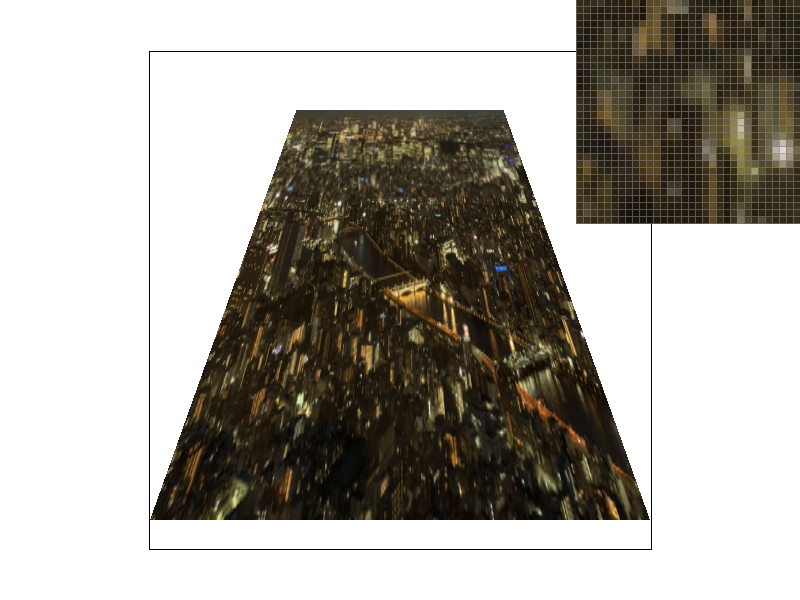
I used a photo I took of Tokyo at night (tokyo_night.png), which is
full of tiny, high-contrast lights and windows: exactly the kind of detail that aliases badly when minified. I
converted it from JPEG to PNG, cropped out the empty sky, scaled it to 1512 × 1066, and stripped its
metadata (including GPS location). tokyo_night.svg maps it onto a
ground plane seen in perspective, built from a 24 × 24 grid of textured triangles whose vertices and texture
coordinates follow the exact perspective projection. The texture is only slightly minified near the bottom of
the view and more and more strongly toward the far edge at the top, so one image spans many mipmap levels.

Results
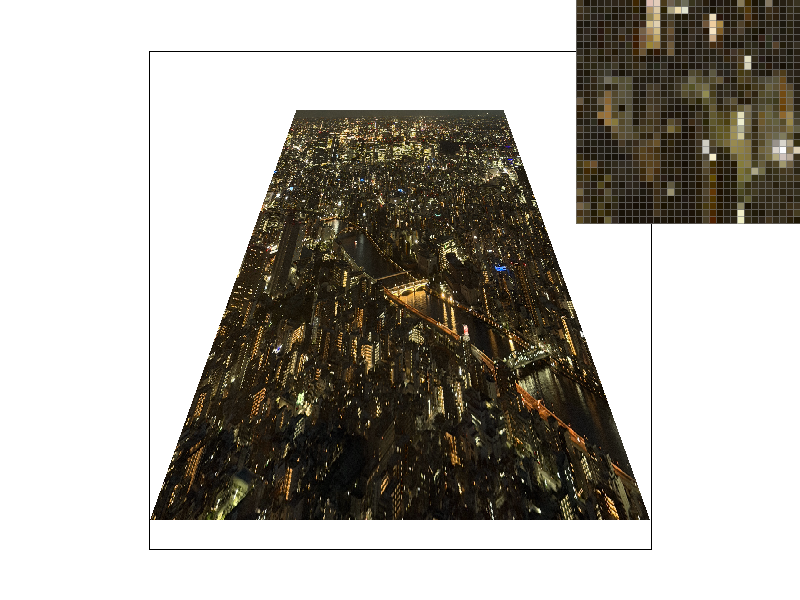
All four screenshots use the default view (800 × 600) and 1 sample per pixel, with the pixel inspector at the same spot in the far, strongly minified part of the image.
 |
 |
|
|
L_ZERO, P_NEAREST |
L_ZERO, P_LINEAR |
 |
 |
|
|
L_NEAREST, P_NEAREST |
L_NEAREST, P_LINEAR |
Each pair shows the full screenshot and, below it, the pixel-inspector region of the same screenshot enlarged on this page (display cropping only; the image files are unmodified).
-
L_ZERO,P_NEAREST. The far part of the city turns into sparkly noise: isolated, very bright pixels next to dark ones. Each pixel shows whichever single texel its sample happens to hit, out of the many under its footprint. -
L_ZERO,P_LINEAR. Slightly softer, but the sparkle remains. Blending four neighboring texels cannot represent a footprint that spans many more. -
L_NEAREST,P_NEAREST. Most of the sparkle is gone, because each lookup reads a pre-averaged texel from a coarser level. The price is some blockiness: nearby pixels can round to different levels, and within a level, nearest sampling shows the coarse texels as small flat blocks. -
L_NEAREST,P_LINEAR. The smoothest of the four: the level removes the aliasing, and bilinear sampling hides the coarse level's texel grid.
To put a number on the sparkle, I measured the mean absolute brightness difference between neighboring pixels
in a patch of the far region, where aliasing noise shows up as large pixel-to-pixel jumps. It is 33.5 for
L_ZERO/P_NEAREST, 30.3 with P_LINEAR, 13.6 for
L_NEAREST/P_NEAREST, and 10.3 for L_NEAREST/P_LINEAR. This is
only a proxy, since blurring lowers it too, but it matches what the screenshots show: level sampling removes most
of the noise, and bilinear pixel sampling smooths a bit more on top.
Tradeoffs: pixel sampling, level sampling, and samples per pixel
I timed svg.draw() on this scene for every combination (800 × 600, Release build on an Intel Core
i9-12900H, average of 5 draws, median of 3 runs; texture loading and mipmap generation are not included).
| Level | Pixel | 1 sample/px (ms) | 16 samples/px (ms) |
|---|---|---|---|
L_ZERO | P_NEAREST | 6.1 | 84.6 |
L_ZERO | P_LINEAR | 5.2 | 72.7 |
L_NEAREST | P_NEAREST | 12.2 | 182.6 |
L_NEAREST | P_LINEAR | 11.9 | 179.7 |
L_LINEAR | P_NEAREST | 15.7 | 224.4 |
L_LINEAR | P_LINEAR | 14.0 | 213.1 |
- Pixel sampling (nearest vs. bilinear). Memory: none extra. Speed: in theory bilinear costs four texel reads instead of one, but in my measurements it was not slower, and was even slightly faster. The extra three texels sit right next to the first one in memory, and the per-sample cost is dominated by the rest of the work, such as interpolating texture coordinates. Antialiasing: it removes blockiness under magnification and helps a little with mild minification, but it cannot fix strong minification, because four texels are still far fewer than the pixel's footprint.
-
Level sampling (mipmaps). Memory: the whole pyramid adds one third to the texture's memory,
since \(1/4 + 1/16 + \dots \approx 1/3\); for my texture, 4.84 MB grows to 6.45 MB. Speed: about twice
as slow as
L_ZEROhere (12 vs. 6 ms), because every sample now interpolates three texture coordinates instead of one and computes a level.L_LINEARadds a second lookup per sample (about 15 ms). Antialiasing: by far the most effective tool against texture minification, at the cost of some blur, and of visible level transitions withL_NEARESTthatL_LINEARsmooths out. - Samples per pixel (supersampling). Memory: the sample buffer grows linearly with the rate. At 800 × 600 it is 5.8 MB at 1 sample and 92 MB at 16. Speed: the work per pixel also grows about linearly; 16 samples took 14 to 15 times as long in every row of the table. Antialiasing: the most general technique, since it also antialiases triangle edges, not just texture detail, but it is by far the most expensive, and for texture minification it only brute-forces what a mipmap lookup gets almost for free.